CPU vs GPU for LLM Inference on Cloud Run: A Measured Comparison with Gemma and an NVIDIA L4
By Vishal Bulbule · November 6, 2026 · 10 min read · Cloud
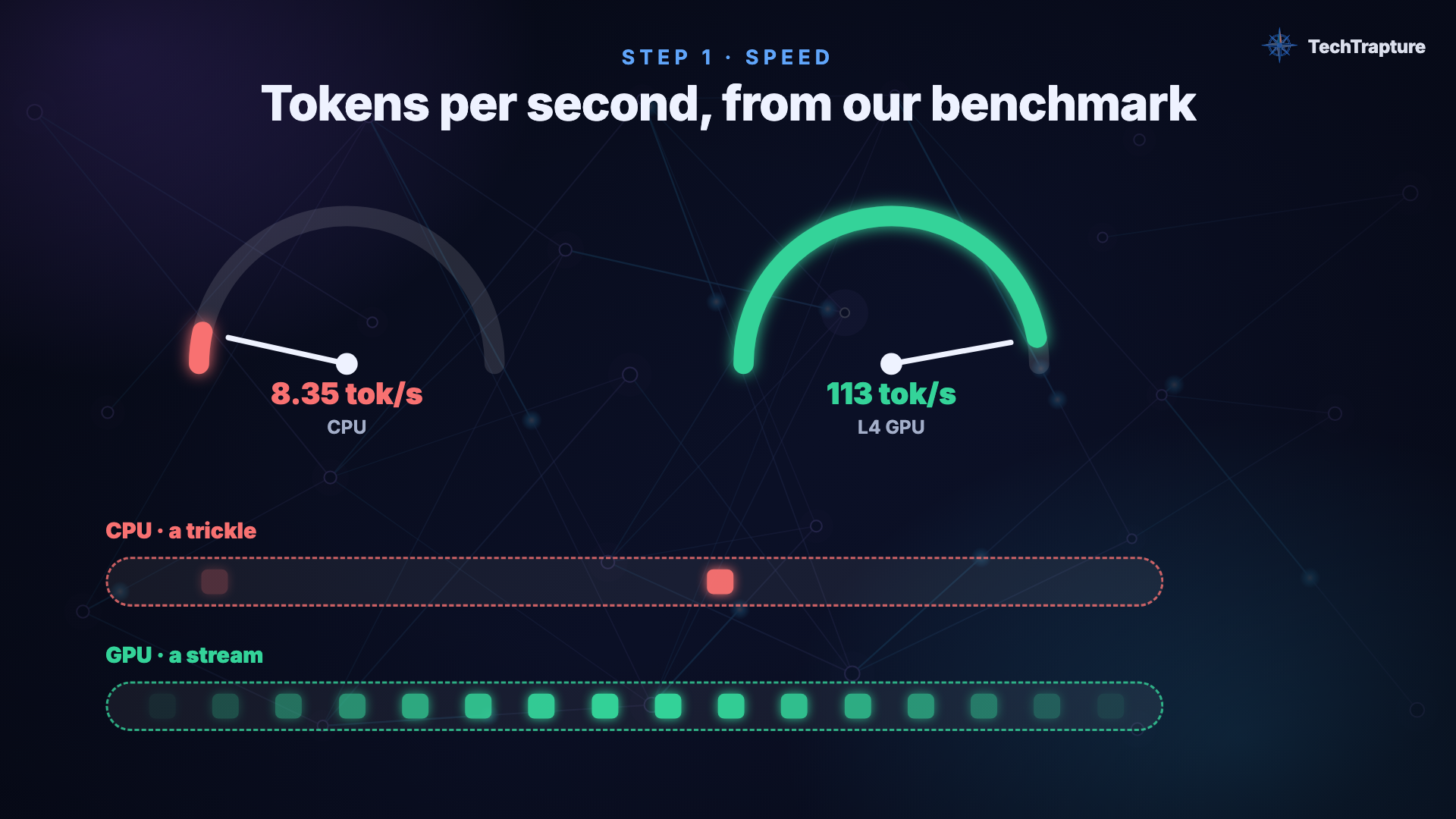
Same model, same container, same platform: the GPU was 13.5× faster per token and 6× cheaper per answer, though it costs twice as much per hour
Vishal Bulbule · Google Developer Expert (Google Cloud) · TechTrapture
Cover: Same model, same Cloud Run service, one difference: 8.35 tokens/s on 4 vCPUs vs 113 tokens/s with an NVIDIA L4.
Abstract
Teams self-hosting open models on serverless platforms face an early choice: run the model on CPU, which needs no GPU quota and bills only per request, or attach a GPU, which costs more per hour and bills per instance. We deployed the same container (Ollama) and the same model (Gemma 2 2B, 4-bit) as two Cloud Run services that differed only in an NVIDIA L4 GPU, and measured generation speed, time to first token, cold start, and cost per million output tokens. On the L4, generation reached 113 tokens/s versus 8.35 tokens/s on 4 vCPUs (13.5×), and a 256-token answer took 2.7 s versus 31.6 s. Although the GPU service costs $1.05/hour versus $0.49/hour for the CPU service, its cost per million output tokens was ≈$2.57 versus ≈$16.30, about 6× cheaper per answer. The GPU's cold start, scaling from zero, was 20.2 s. We discuss when the CPU option is still the right call: very low request volumes, where per-request billing and the GPU's idle tail dominate.
1. Introduction
Cloud Run added NVIDIA GPU support, which makes it one of the simplest ways to self-host an open model on Google Cloud: one container, scale to zero, no cluster. That raises a practical question every team asks first: do I actually need the GPU?
The CPU path is attractive. It needs no GPU quota, it is billed only while a request runs, and small models such as Gemma 2 2B do run on CPU. The GPU path costs more per hour and needs quota. Price per hour, however, is the wrong unit for comparing the two. What a product pays for is answers.
This post reports a controlled comparison: same image, same model, same region, same memory and vCPU count. The only difference is whether one NVIDIA L4 is attached. We report speed, latency, cold start, and cost per million output tokens, and we state the conditions under which each option wins.
2. Background
Ollama is a popular open-source runtime for local LLMs. It packages models in the GGUF format, mostly 4-bit quantized, and runs them on llama.cpp on CPU or GPU. It exposes a native API (/api/generate, /api/chat) and an OpenAI-compatible API (/v1/chat/completions).
Cloud Run GPUs. A Cloud Run service can attach one GPU per instance. We used an NVIDIA L4 (24 GB). GPU services require instance-based billing (--no-cpu-throttling): the whole instance is billed while it is up, including an idle period before it scales to zero. CPU services can use request-based billing, where CPU and memory are billed only while requests are being processed.
Token speed terms.
- Prompt processing (prefill): reading the input.
- Generation (decode): producing output tokens, one at a time.
- Time to first token (TTFT): how long until text starts appearing.
3. Experimental setup
3.1 Platform and configuration
| CPU service | GPU service | |
|---|---|---|
| Platform | Cloud Run (europe-west1) | Cloud Run (europe-west1) |
| Container | ollama/ollama | ollama/ollama |
| Model | gemma2:2b (4-bit, 1.6 GB) | gemma2:2b (4-bit, 1.6 GB) |
| vCPU / memory | 4 / 16 GiB | 4 / 16 GiB |
| GPU | — | 1× NVIDIA L4 (24 GB), no zonal redundancy |
| Billing | request-based | instance-based (required for GPU) |
| Scaling | min 0, max 1 | min 0, max 1 |
| Model storage | Cloud Storage bucket mounted as a volume (shared by both) | Cloud Storage bucket mounted as a volume (shared by both) |
The two services were identical except for the GPU flags. Both mounted the same Cloud Storage bucket, so the model was downloaded once and read by both.
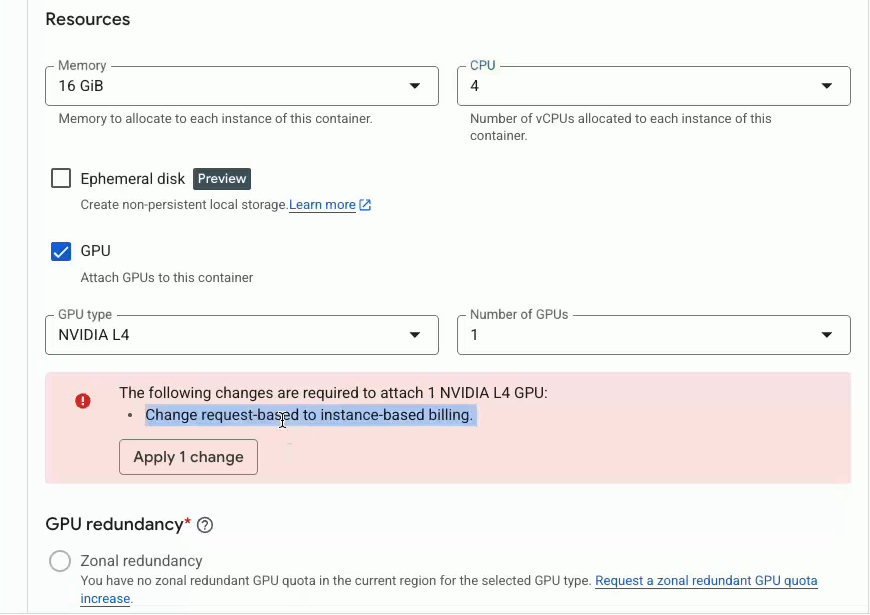
The GPU service in the Cloud Run console: same 4 vCPU / 16 GiB, plus one NVIDIA L4. Attaching the GPU forces the switch from request-based to instance-based billing.
3.2 Deployment
CPU service:
gcloud run deploy ollama-cpu \
  --image ollama/ollama \
  --region europe-west1 \
  --cpu 4 --memory 16Gi \
  --port 11434 \
  --min-instances 0 --max-instances 1 \
  --timeout 600 \
  --set-env-vars OLLAMA_KEEP_ALIVE=-1 \
  --add-volume name=models,type=cloud-storage,bucket=$BUCKET \
  --add-volume-mount volume=models,mount-path=/root/.ollama
GPU service, which is the same command plus four flags:
  --gpu 1 --gpu-type nvidia-l4 \
  --no-gpu-zonal-redundancy \
  --no-cpu-throttling
--no-cpu-throttling is required for GPU services and switches the service to instance-based billing. --no-gpu-zonal-redundancy is cheaper and matched our available quota.
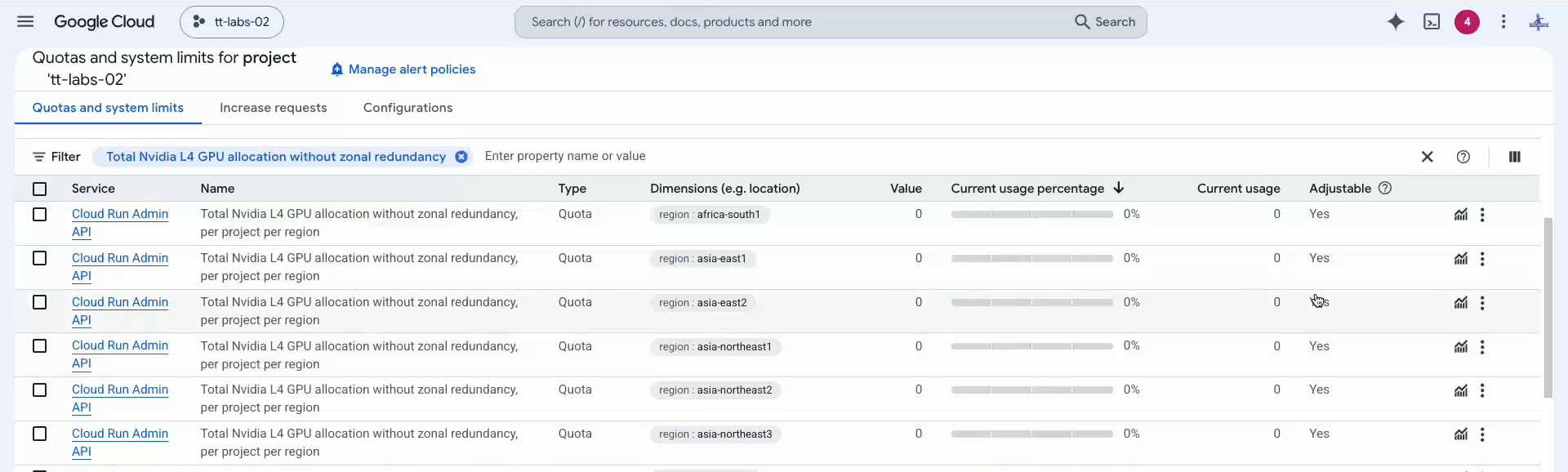
IAM & Admin → Quotas and system limits, filtered on "Total Nvidia L4 GPU allocation without zonal redundancy". It is set per region and is 0 in most regions until you request it.
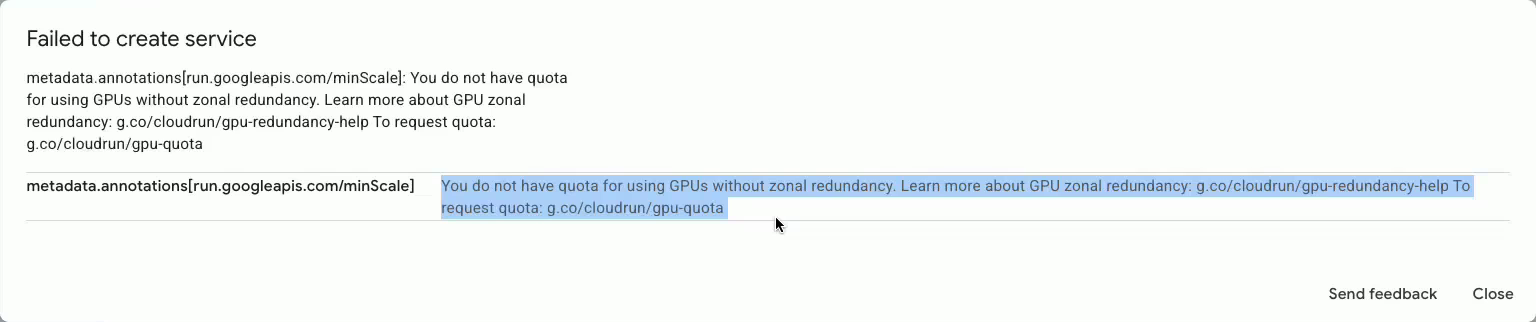
Our first attempt to create the GPU service failed on quota, which is why the quota page above matters.
3.3 Workload and method
- Prompt: one fixed prompt ("Why are GPUs better than CPUs for AI workloads?").
- Decoding: temperature 0, fixed seed (42),
num_predict= 256 output tokens, so every run does the same amount of work. - Runs: 5 sequential requests per service, through Ollama's native
/api/generate. - Metrics: taken from Ollama's own timing fields: prompt-eval and eval token counts and durations, and load duration. Wall time was measured client-side.
- Cold start: measured as the first request after the GPU service had scaled to zero.
- Pricing: Google Cloud Billing Catalog list prices for europe-west1 on the day of the run (2 Nov 2026), before free tier.
3.4 Cost model
cost per 1M output tokens = price per hour ÷ (tokens/s × 3600) × 1,000,000
This assumes the instance is kept busy. We return to idle cost in Section 5.
Video walkthrough
4. Results
4.1 Speed
| Metric | CPU (4 vCPU) | GPU (L4) | GPU advantage |
|---|---|---|---|
| Generation (decode), warm runs | 8.35 tok/s | 113 tok/s | ~13.5× |
| Time for a 256-token answer (warm) | 31.6 s | 2.7 s | ~11.7× |
| Prompt processing (prefill) | 49.8 tok/s | 791 tok/s | ~16× |
| Time to first token, server-side (warm) | ~390 ms | ~23 ms | — |
| Network + routing overhead | 444 ms | 421 ms | same |
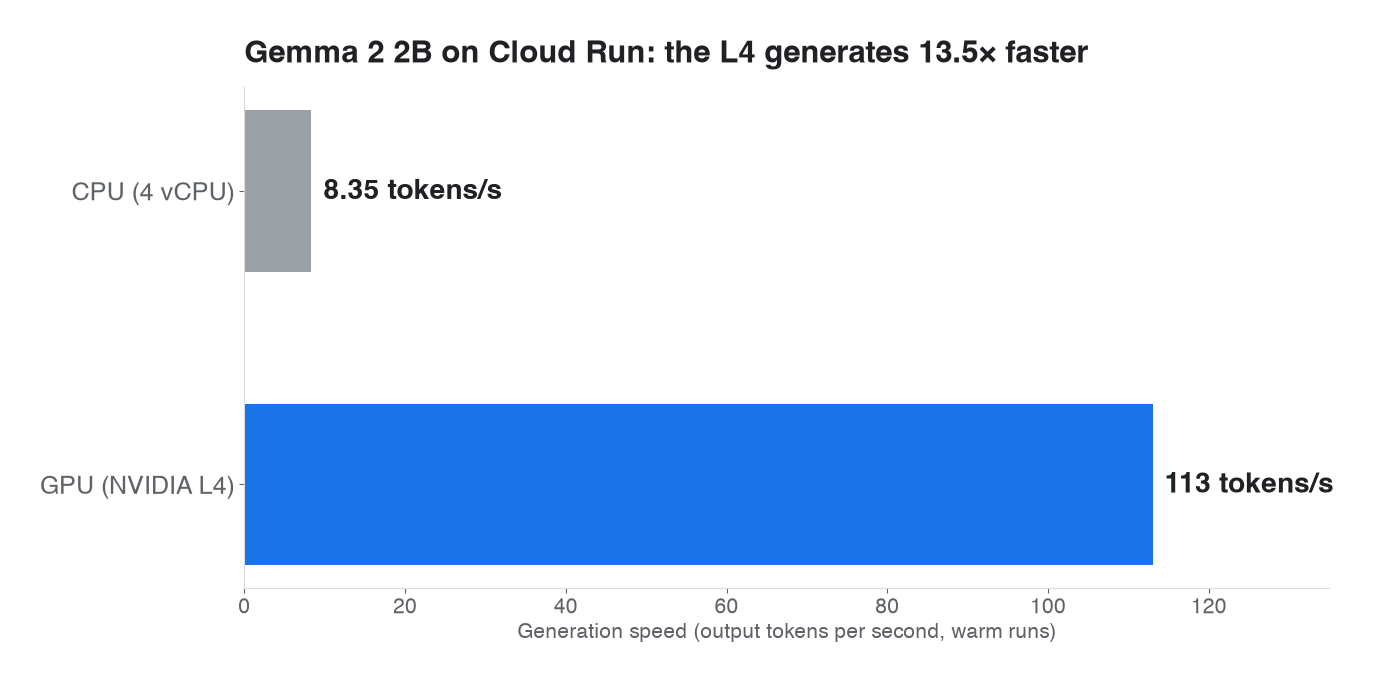
Generation speed, warm runs: 8.35 tokens/s on CPU vs 113 tokens/s on the L4.
The GPU improves both phases of inference. Prefill is about 16× faster, and generation about 13.5× faster. Network and routing overhead was the same for both services, about 0.4 s from the client, so for short prompts the end-to-end difference is driven by generation.
At 8.35 tokens/s, a reader sees a 256-token answer appear over roughly half a minute. At 113 tokens/s it appears in under three seconds, faster than anyone reads.
4.2 Cold start
The first GPU request after scaling to zero took 20.2 s wall time. 14.6 s of that was waiting for the first token, which is mostly loading the 1.6 GB model from the mounted bucket into GPU memory. Warm requests started in about 23 ms server-side.
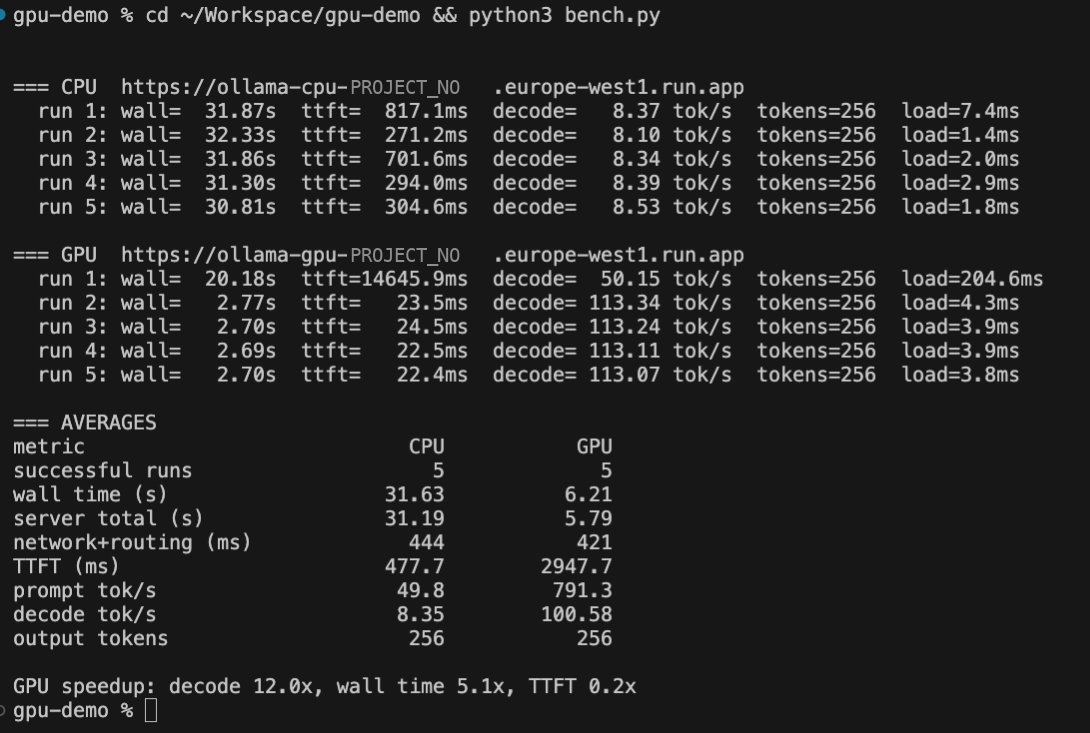
The benchmark output. GPU run 1 is the cold start (20.2 s wall, 14.6 s to first token while the model loads); runs 2–5 are warm at ~113 tokens/s, which is why the 5-run GPU average shows 100.58.

A test question to the GPU service: "Why is the sky blue?". Ollama's own timing fields at the end show 14.4 s before generation began, then 263 tokens in 2.31 s (about 114 tok/s).
4.3 Cost per answer
| Price per second | Per hour (busy) | Tokens per hour | Cost per 1M output tokens | |
|---|---|---|---|---|
| CPU (4 vCPU) | $0.000136 | $0.49 | ~30,000 | ≈ $16.30 |
| GPU (L4) | $0.000291 | $1.05 | ~407,000 | ≈ $2.57 |
Breakdown, list prices for europe-west1:
- CPU: 4 vCPU × $0.000024/s + 16 GiB × $0.0000025/s, request-based billing.
- GPU: L4 at $0.0001867/s + 4 vCPU × $0.000018/s + 16 GiB × $0.000002/s, instance-based billing.

List prices, europe-west1, 2 Nov 2026. The GPU service costs ~2× more per hour but ~6× less per million output tokens when kept busy.
The GPU costs about 2× more per hour and about 6× less per answer.
5. Discussion
5.1 Cheaper per hour is not cheaper per answer
The CPU service looks cheaper on the pricing page. Per unit of useful output, it is the expensive option, because it produces roughly 13× fewer tokens in the same hour. Whenever the instance is kept reasonably busy, the GPU wins on cost as well as speed.
5.2 When the CPU still wins
The cost model above assumes a busy instance. Two billing details change the answer at very low volume:
- Request-based vs instance-based billing. The CPU service is billed only while requests run. The GPU service is billed for the whole instance lifetime.
- The idle tail. After the last request, a GPU instance stays up, and billed, for a while before scaling to zero. In our runs, scale-to-zero happened about 10 minutes after the last request.
For a handful of requests a day, such as an internal tool, a nightly batch or a prototype, a CPU service can therefore be cheaper overall, provided users accept a 30-second answer. As soon as there is steady traffic or a human waiting on the answer, the GPU is the better choice on both speed and cost.

What went wrong first: when the GPU service got a fresh instance, the model we had pulled earlier was gone, so the benchmark failed with HTTP 404 "model not found". This is why the first note below is about storing the model outside the container.
5.3 Practical notes
- Store the model outside the container. Cloud Run instances start empty. Mounting a Cloud Storage bucket means the model is downloaded once. Mount it where Ollama writes models (
/root/.ollama); otherwise downloads land on the instance's in-memory disk and vanish with it. - Keep the model loaded.
OLLAMA_KEEP_ALIVE=-1stops Ollama from unloading the model after 5 idle minutes while the instance is alive. - Lock it down. Ollama has no authentication of its own. Use
--no-allow-unauthenticatedand let Cloud Run IAM guard the endpoint.
6. Limitations
- Single model, single size. Gemma 2 2B in 4-bit is small. Larger models widen the gap, and beyond a certain size they become impractical on CPU.
- Single-user, sequential workload. We measured one request at a time. Concurrency changes the picture, especially for engines built for batching. That is the subject of the companion study on Ollama vs vLLM.
- Small sample. Five runs per service with a fixed prompt. The differences are an order of magnitude, far larger than run-to-run noise, but exact values will vary.
- Prices are list prices for one region on one day, before free tier and discounts.
- Client location. Requests came from India to europe-west1. This affects end-to-end latency, not the server-side speeds reported.
7. Conclusion
For LLM inference on Cloud Run, an NVIDIA L4 made Gemma 2 2B about 13.5× faster at generating text and about 6× cheaper per answer than 4 vCPUs, even though it costs about 2× more per hour. CPU deployments still make sense for very low, latency-tolerant volumes, where per-request billing avoids paying for idle GPU time. For anything with real users, the GPU pays for itself.
Decision rule: compare cost per answer at your expected load, not price per hour.
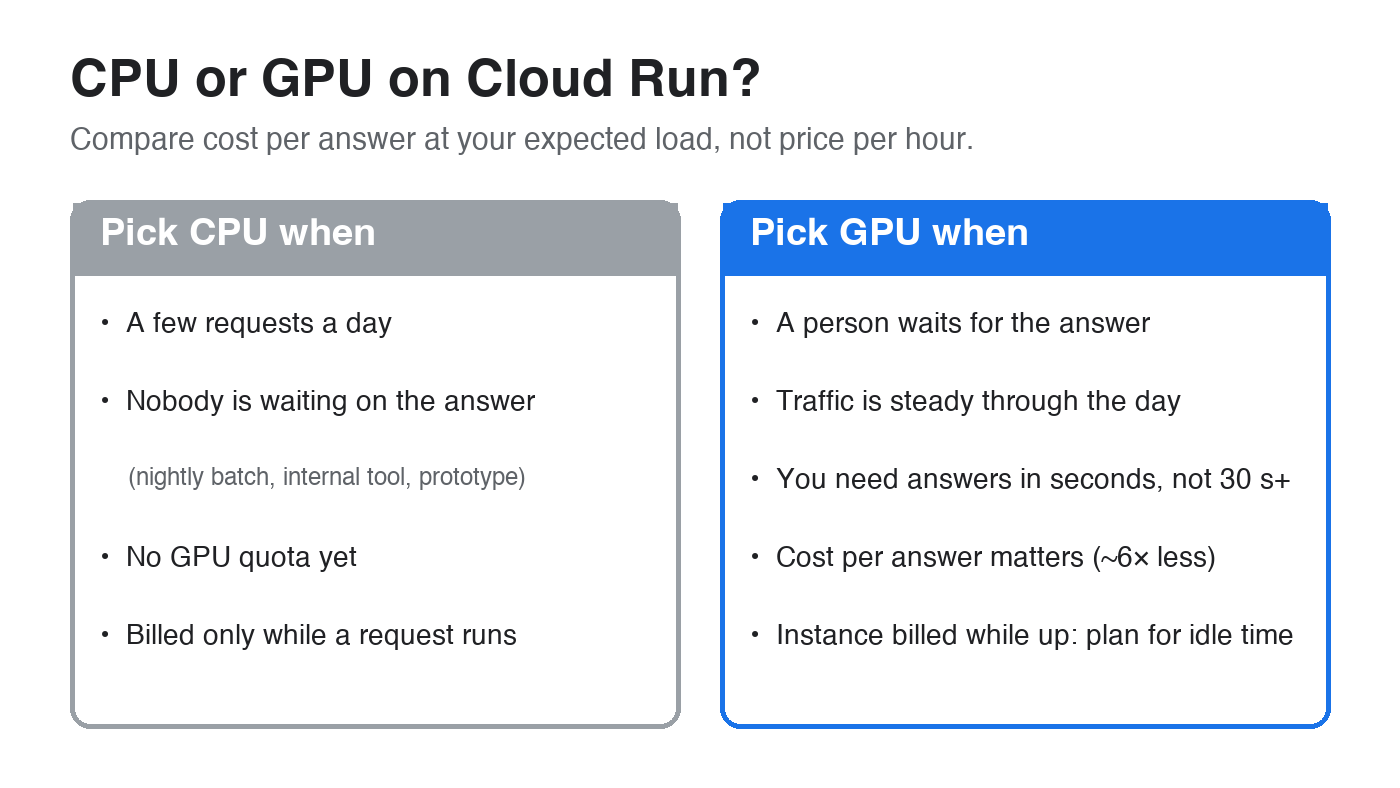
The decision in one card.
References
- Google Cloud — Configure GPUs for Cloud Run services: https://docs.cloud.google.com/run/docs/configuring/services/gpu
- Google Cloud — Cloud Run pricing: https://cloud.google.com/run/pricing
- Google Cloud — Run LLM inference on Cloud Run GPUs with Ollama: https://docs.cloud.google.com/run/docs/tutorials/gpu-gemma-with-ollama
- Google Cloud — Best practices for AI inference on Cloud Run with GPUs: https://docs.cloud.google.com/run/docs/configuring/services/gpu-best-practices
- Ollama — FAQ (keep-alive, parallel requests): https://docs.ollama.com/faq
- Gemma 2 2B model card: https://huggingface.co/google/gemma-2-2b-it
Companion study: Ollama vs vLLM on Cloud Run with an NVIDIA L4