Ollama vs vLLM on Cloud Run with an NVIDIA L4: A Real Benchmark from 1 to 48 Concurrent Users
By Vishal Bulbule · November 6, 2026 · 22 min read · Cloud
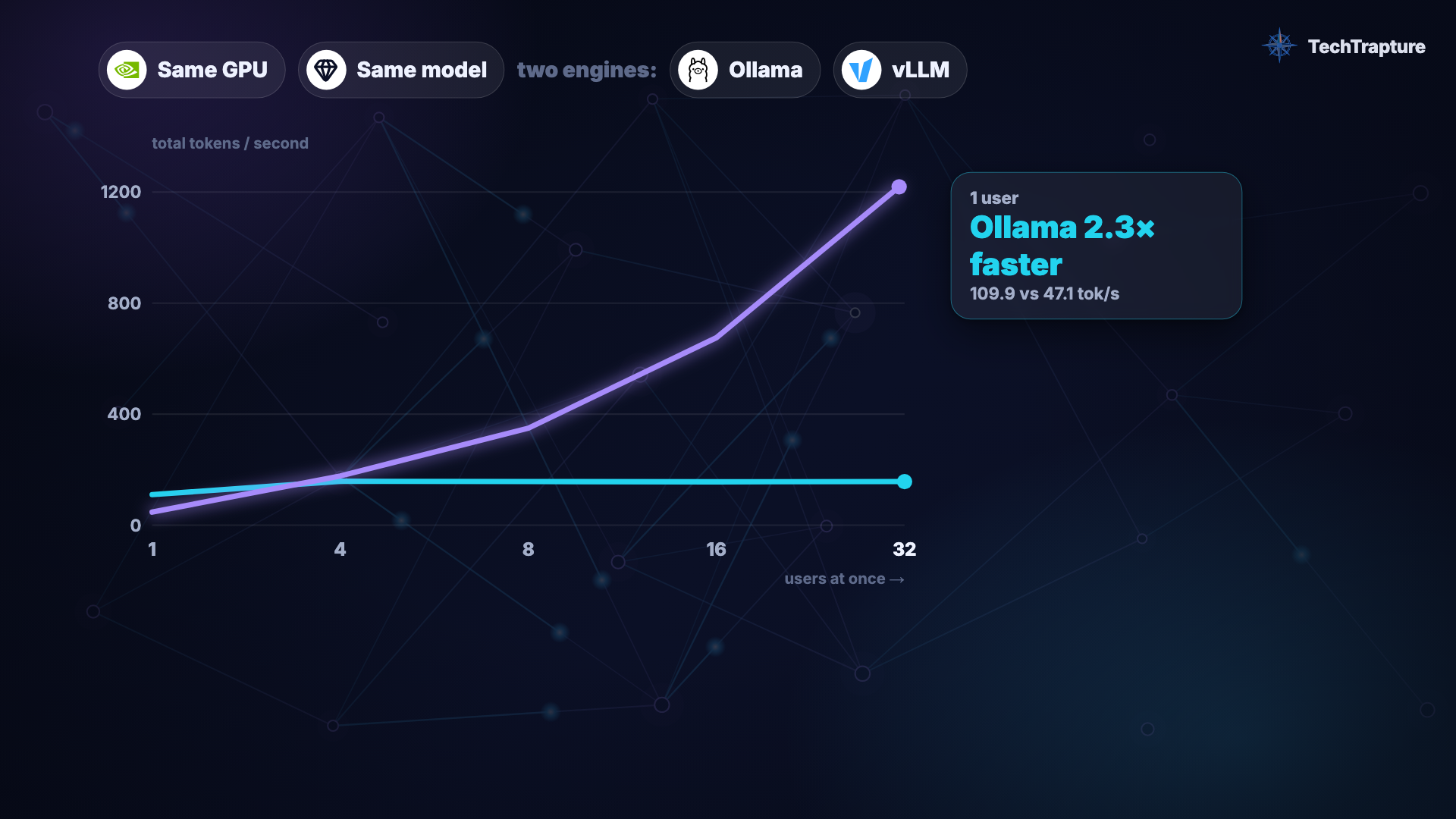
Same GPU, same model. Ollama was 2.4× faster for one user. At 32 users vLLM was 7.7× faster than Ollama's defaults, and still 3.4× faster after we gave Ollama 32 parallel slots. Then Cloud Run's autoscaling billed us for GPUs that served nobody, and with Ollama it sent users to a GPU that wasn't ready yet.
Vishal Bulbule · Google Developer Expert (Google Cloud) · TechTrapture
Cover: Total tokens/s as users grow, same L4 GPU and same Gemma 4 E2B model. From the run recorded for the video (1 user: Ollama 109.9 vs vLLM 47.1 tok/s); the tables below use our dry run from the same day, and throughput differed by under 3%.
Abstract
We compared two popular open-source inference engines, Ollama and vLLM, serving the same model (Gemma 4 E2B) on identical Cloud Run services with one NVIDIA L4 GPU each. A closed-loop load generator ran 1, 4, 8, 16 and 32 concurrent users for 60 seconds per level, and we measured total throughput, time to first token (TTFT), cost per million output tokens, GPU utilization, and autoscaling behaviour beyond one instance.
For a single user, Ollama (4-bit) generated 113 tokens/s versus vLLM's 47 tokens/s (BF16). From 4 users upward vLLM overtook it. At 32 users vLLM reached 1,235 tokens/s with a median TTFT of 0.47 s, while Ollama stayed flat at about 160 tokens/s and its median TTFT grew to 48 s. At the same $1.42/hour, the cost per million output tokens was $0.32 (vLLM) versus $2.47 (Ollama). Cloud Run's GPU utilization metric read 79–83% for Ollama, despite 7.7× lower throughput. Under load beyond one instance, Cloud Run started a second GPU instance before the first was full; the new instance took 6 min 21 s to become ready and was billed throughout. We discuss engine selection, metric pitfalls, and three cost strategies for the scale-out gap.
Phase 1 compared Ollama's default (one request at a time) against vLLM tuned to 32 sequences. After readers pointed out that Ollama's TTFT looked like queueing, we ran a phase 2 with OLLAMA_NUM_PARALLEL=32 and everything else unchanged. Ollama's median TTFT at 32 users fell from 48 s to 1.5 s and its throughput more than doubled, to 359 tokens/s, but vLLM still delivered 3.4× more tokens per GPU ($0.32 versus $1.10 per million). Phase 2 also showed that Ollama 0.40.13 runs speculative decoding by default for Gemma 4, which vLLM did not, and that Cloud Run routed users to a new Ollama instance about 4 minutes before its model was loaded, giving a p95 TTFT of 274 s.
1. Introduction
Most guides to running vLLM on Cloud Run show how to deploy it: Google's own documentation, its codelab, community posts and templates. Very few measure what happens under concurrent load, and none that we found compare vLLM against Ollama on the same hardware or examine what Cloud Run does when one GPU is no longer enough.
That gap matters for cost. On a GPU, the engine decides how many useful tokens you get per GPU-hour. On Cloud Run, autoscaling decides how many GPU-hours you pay for.
This study answers four questions:
- RQ1: How do Ollama and vLLM compare in throughput and latency as concurrent users grow from 1 to 32 on one L4?
- RQ2: What does that mean for cost per million tokens?
- RQ3: Does Cloud Run's GPU utilization metric reflect how efficiently the GPU is used?
- RQ4: What happens, and what does it cost, when load exceeds one instance?
2. Background
vLLM is an open-source engine that serves LLMs to many users at once, with an OpenAI-compatible API, under Apache 2.0. It came out of UC Berkeley's Sky Computing Lab, and its core technique, PagedAttention, was published at SOSP 2023. Two ideas matter for this study:
- Continuous batching: requests join and leave the running batch at every generation step, so many users share each pass over the model's weights.
- PagedAttention: the KV cache, the per-conversation working memory, is allocated in small pages as it grows, instead of one large block reserved per request. Far more conversations fit in the same GPU memory.
Ollama is built for running models locally and simply, on top of llama.cpp with 4-bit GGUF models. By default it processes one request at a time per model (OLLAMA_NUM_PARALLEL=1) and queues the rest.
Why one user is different from many. Generating one token at a time is limited mainly by how fast the GPU can read the model's weights from memory, not by arithmetic. A smaller (4-bit) model is faster for a single user. Batching many users into the same step reuses each weight read for all of them, which is where a serving engine pulls ahead.
Gemma 4 E2B. "E2B" means effective 2 billion parameters: 2.3B effective, 5.1B including embeddings (model card). In BF16 the weights occupy about 9 GB of GPU memory. The model is Apache 2.0 and not gated on Hugging Face.
3. Experimental setup
3.1 Platform
| Ollama service | vLLM service | |
|---|---|---|
| Platform | Cloud Run, europe-west1 | Cloud Run, europe-west1 |
| GPU | 1× NVIDIA L4 (24 GB) | 1× NVIDIA L4 (24 GB) |
| vCPU / memory | 8 / 32 GiB | 8 / 32 GiB |
| Price while running | $1.42/hour | $1.42/hour |
| Engine | Ollama 0.40.13 | vLLM 0.33.0 (vllm/vllm-openai:v0.33.0) |
| Model | gemma4:e2b | google/gemma-4-E2B-it |
| Precision | Q4_K_M (4-bit GGUF) | BF16 |
| Requests in parallel | 1 in phase 1 (default); 32 in phase 2 (Section 4.6) | 32 (--max-num-seqs=32) |
| Speculative decoding | on, by default (Gemma 4 draft head, ~40% accepted) | off |
| Startup probe | default TCP | httpGet /health |
| Cloud Run concurrency | 32 | 32 |
| Context length | 4,096 | 4,096 |
| Thinking mode | off | off |
| Max instances | 1 (2 in Section 4.5) | 1 (2 in Section 4.5) |
Price breakdown, europe-west1 list prices, 2 Nov 2026: L4 without zonal redundancy at $0.0001867/s, plus 8 vCPU × $0.000018/s, plus 32 GiB × $0.000002/s = $0.0003947/s ≈ $1.42/hour.
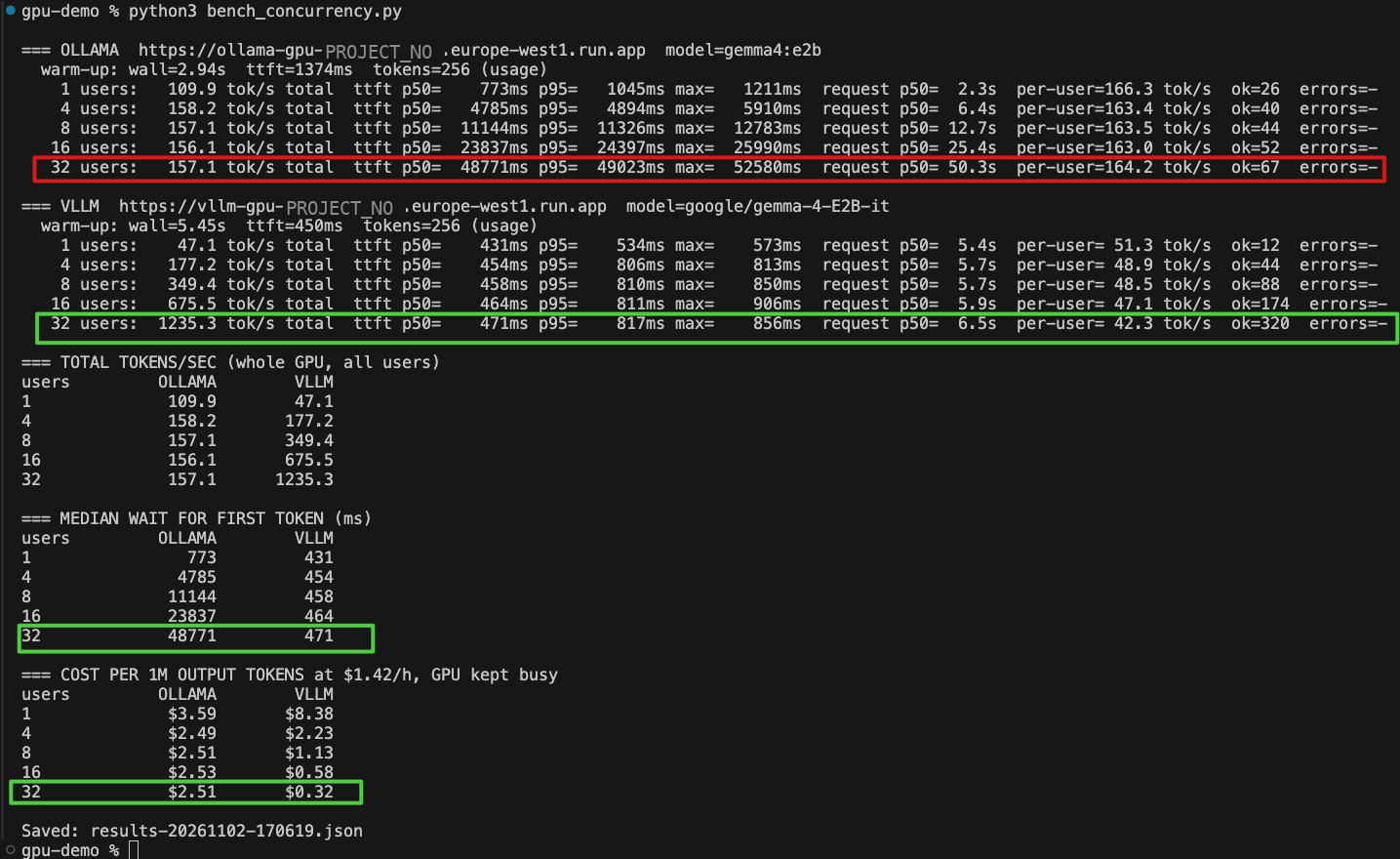
The phase 1 benchmark output. Red: Ollama at 32 users, 157 tok/s and a 48.8 s median wait. Green: vLLM at 32 users, 1,235 tok/s and 0.47 s.
3.2 vLLM deployment
gcloud run deploy vllm-gpu \
  --image vllm/vllm-openai:v0.33.0 \
  --region europe-west1 \
  --cpu 8 --memory 32Gi \
  --gpu 1 --gpu-type nvidia-l4 --no-gpu-zonal-redundancy \
  --no-cpu-throttling \
  --concurrency 32 --min-instances 0 --max-instances 1 \
  --timeout 600 --port 8080 \
  --startup-probe httpGet.path=/health,httpGet.port=8080,initialDelaySeconds=240,periodSeconds=10,failureThreshold=120,timeoutSeconds=5 \
  --command vllm \
  --args="serve,google/gemma-4-E2B-it,--dtype=bfloat16,--max-model-len=4096,--max-num-seqs=32,--gpu-memory-utilization=0.90,--limit-mm-per-prompt.image=0,--limit-mm-per-prompt.audio=0,--limit-mm-per-prompt.video=0,--enable-prefix-caching,--enable-chunked-prefill,--host=0.0.0.0,--port=8080"
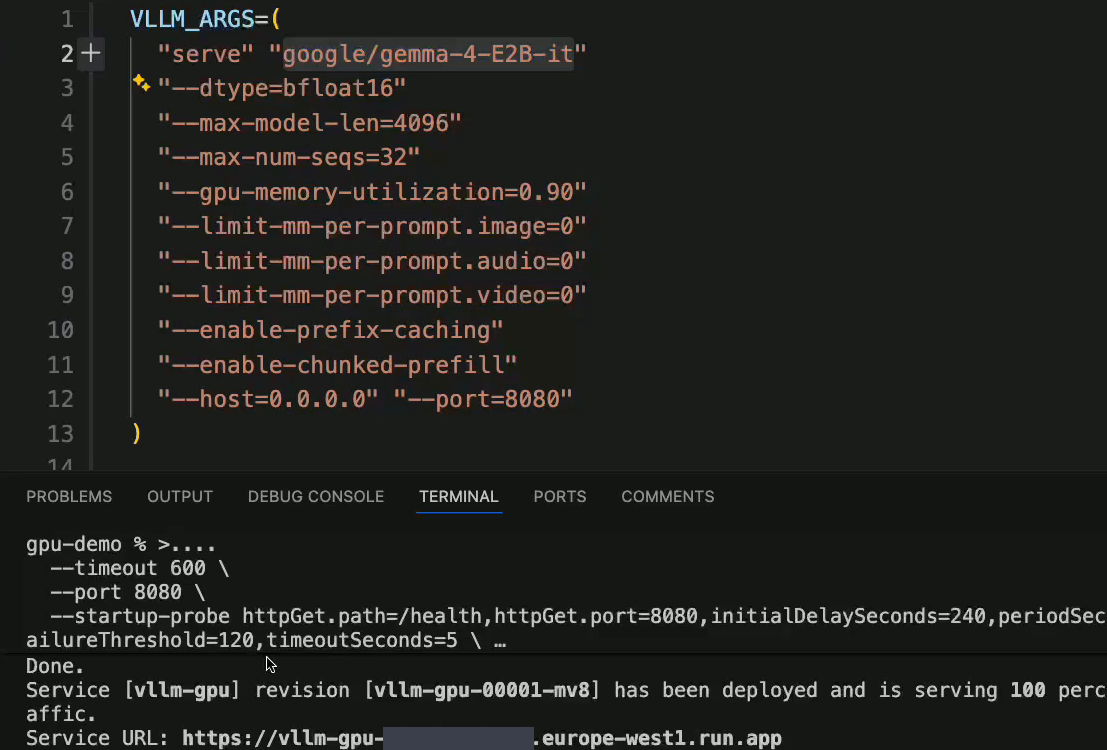
The real deployment: the vLLM arguments in our script, and gcloud confirming the service is deployed and serving traffic.
Key choices:
--concurrency 32matches--max-num-seqs=32, following Google's guidance.- Image, audio and video inputs are disabled because this is a text-only API. With only image and audio disabled, vLLM still profiled a video input at startup.
- The startup probe checks
/health, which passes only once the model is loaded. It allows far more time than the 240 s used in Google's example, because cold start here was about 7 minutes. - vLLM downloads the weights from Hugging Face at every cold start. No token is needed because the model is not gated.
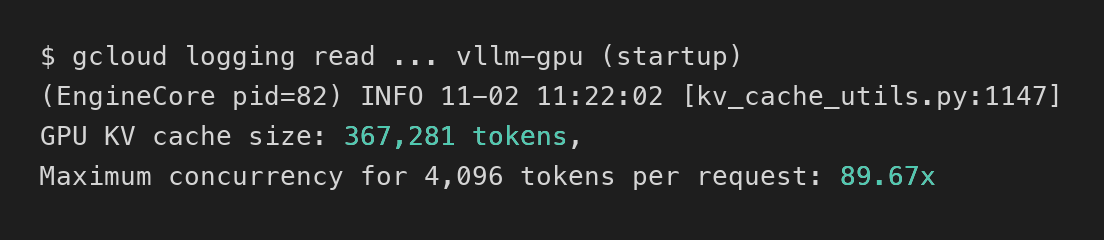
vLLM's own startup log: room in the KV cache for ~90 concurrent 4,096-token conversations.
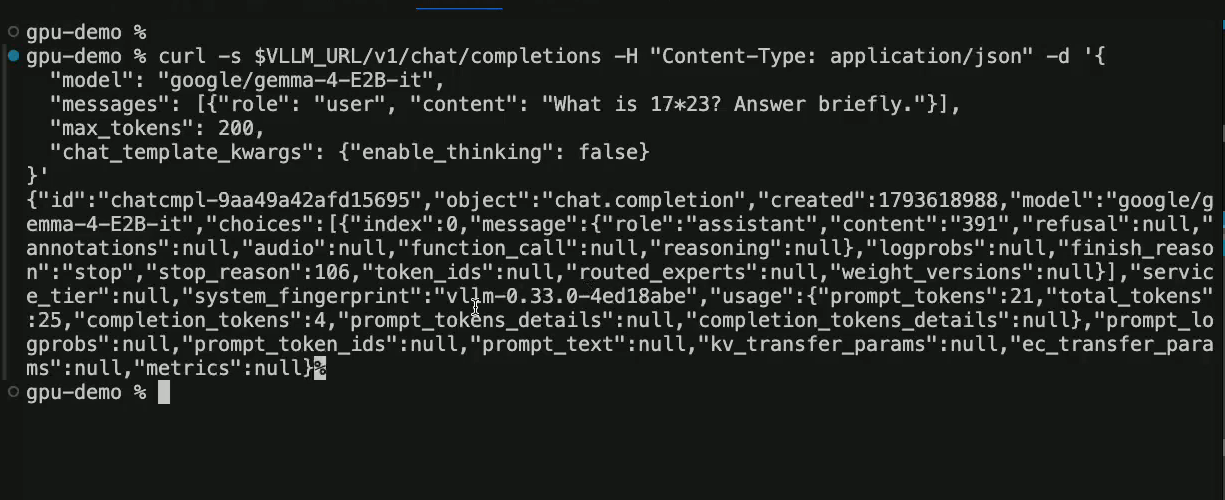
The first question to the deployed vLLM service: "What is 17*23? Answer briefly." The answer, 391, is in the content field.
3.3 Load generator and method
We used a closed-loop benchmark written in standard-library Python:
- Levels: 1, 4, 8, 16, 32 concurrent users. Each user sends a request, waits for the full streamed answer, and immediately sends the next. Each level runs for 60 seconds, and requests in flight at the deadline are allowed to finish.
- Requests: the same OpenAI-compatible endpoint for both engines (
/v1/chat/completions, streaming). Eight different long-answer prompts rotate, so no single cached prompt favours either engine.temperature= 0 andmax_tokens= 256; every request generated exactly 256 tokens. - Metrics:
- Total tokens/s: all completion tokens divided by wall time, i.e. throughput for everyone.
- TTFT: client-side, time from sending the request to the first content token. Median and 95th percentile reported.
- Per-user decode speed: how fast an individual answer streams once it starts.
- Cost per 1M output tokens: $1.42/h ÷ (total tokens/s × 3600) × 10⁶, assuming the GPU is kept busy.
- Warm-up: one request per engine before measuring, excluded from results.
- Client: a laptop in Pune, India, calling europe-west1. Network round-trip time is included in TTFT for both engines.
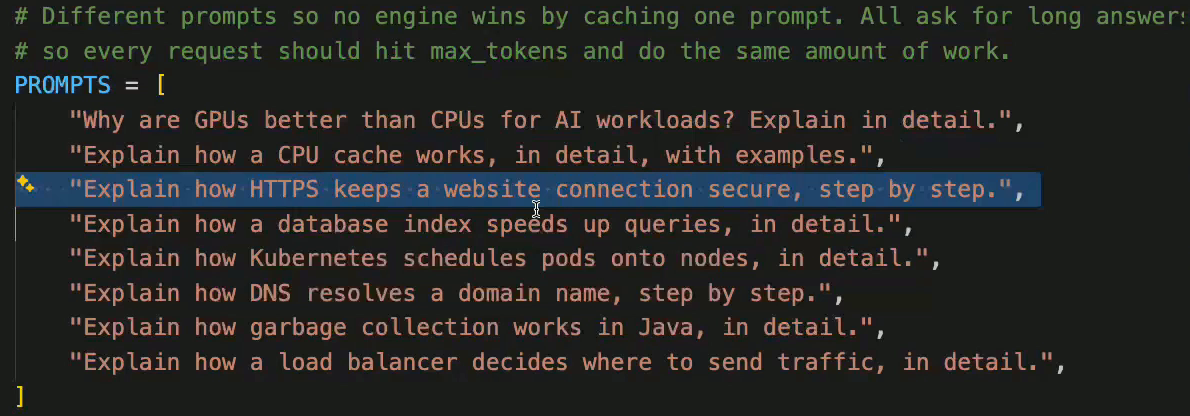
The eight questions the benchmark rotated through, from bench_concurrency.py. All of them ask for long answers, so every request does the same amount of work.
3.4 Fairness controls
- Thinking mode off on both engines. Gemma 4 can reason before answering, which adds hidden output tokens. vLLM:
"chat_template_kwargs": {"enable_thinking": false}. Ollama on its OpenAI-compatible endpoint thinks by default and ignored"think": false(about 250 reasoning tokens still produced). Only"reasoning_effort": "none"disabled it. Without this control, Ollama's numbers would have included its thinking. - Same context length (4,096) on both engines, same instance shape, same price.
- Precision is not equal, by design. Each engine runs its common default: Ollama 4-bit, vLLM BF16. This favours Ollama per token at low load. See Limitations.
- Speculative decoding is not equal either. We found this only from the phase 2 logs. Ollama 0.40.13 loads Gemma 4's multi-token-prediction "assistant" head as a draft model and decodes speculatively by default (
draft acceptance ≈ 0.41, mean len ≈ 2.2). It did so in both phases. vLLM ran without speculative decoding. This also favours Ollama at one user. - Phase 1 is defaults versus tuned. In phase 1, vLLM was set to 32 sequences to match Cloud Run's concurrency, but Ollama kept its default of one request at a time. Phase 2 (Section 4.6) gives Ollama 32 slots too.
Video walkthrough
4. Results
4.1 Throughput and latency (RQ1)
| Users | Ollama total tok/s | Ollama TTFT median (p95) | vLLM total tok/s | vLLM TTFT median (p95) |
|---|---|---|---|---|
| 1 | 113 | 0.68 s (1.0 s) | 47 | 0.44 s (0.50 s) |
| 4 | 161 | 4.7 s (4.8 s) | 173 | 0.46 s (2.5 s) |
| 8 | 160 | 11.0 s (11.1 s) | 352 | 0.46 s (0.81 s) |
| 16 | 160 | 23.5 s (23.6 s) | 686 | 0.47 s (0.81 s) |
| 32 | 160 | 48.1 s (48.6 s) | 1,235 | 0.47 s (0.82 s) |
Per-user decode speed: Ollama about 165 tok/s at every level, but only one user at a time; vLLM 52 tok/s at 1 user and 43 tok/s at 32.
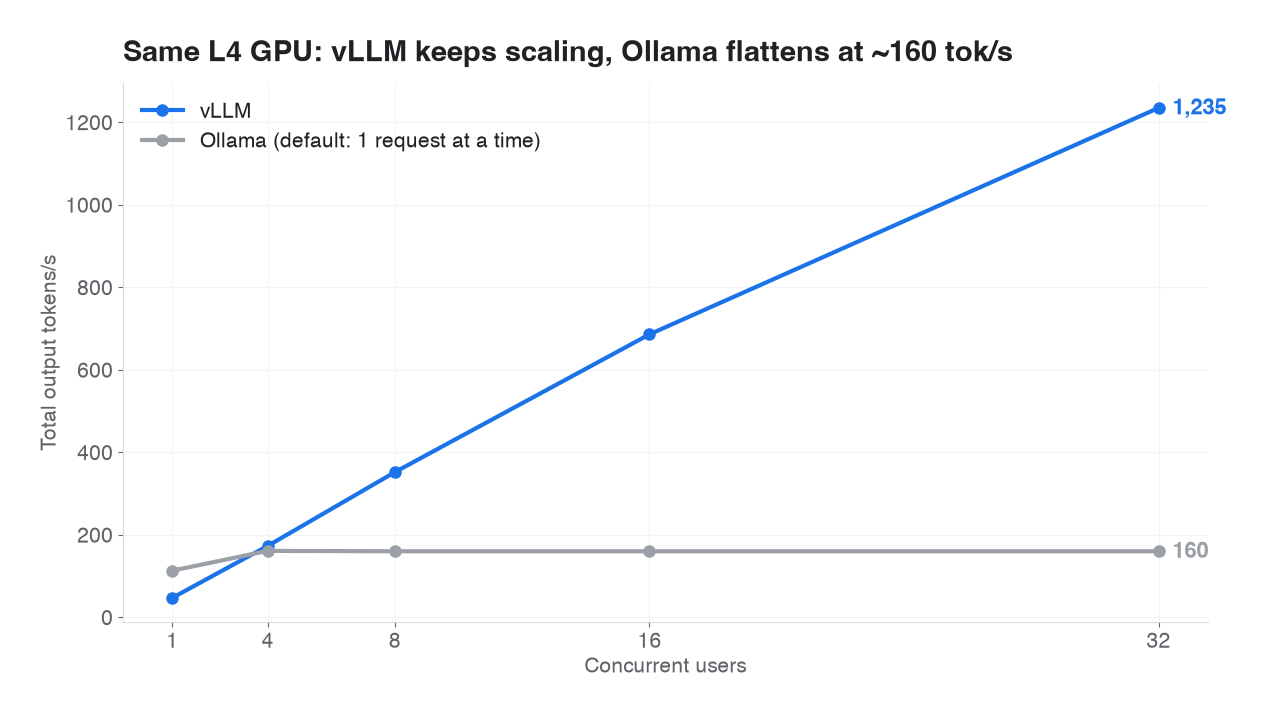
Total throughput. vLLM overtakes Ollama between 1 and 4 users and reaches 1,235 tok/s at 32.
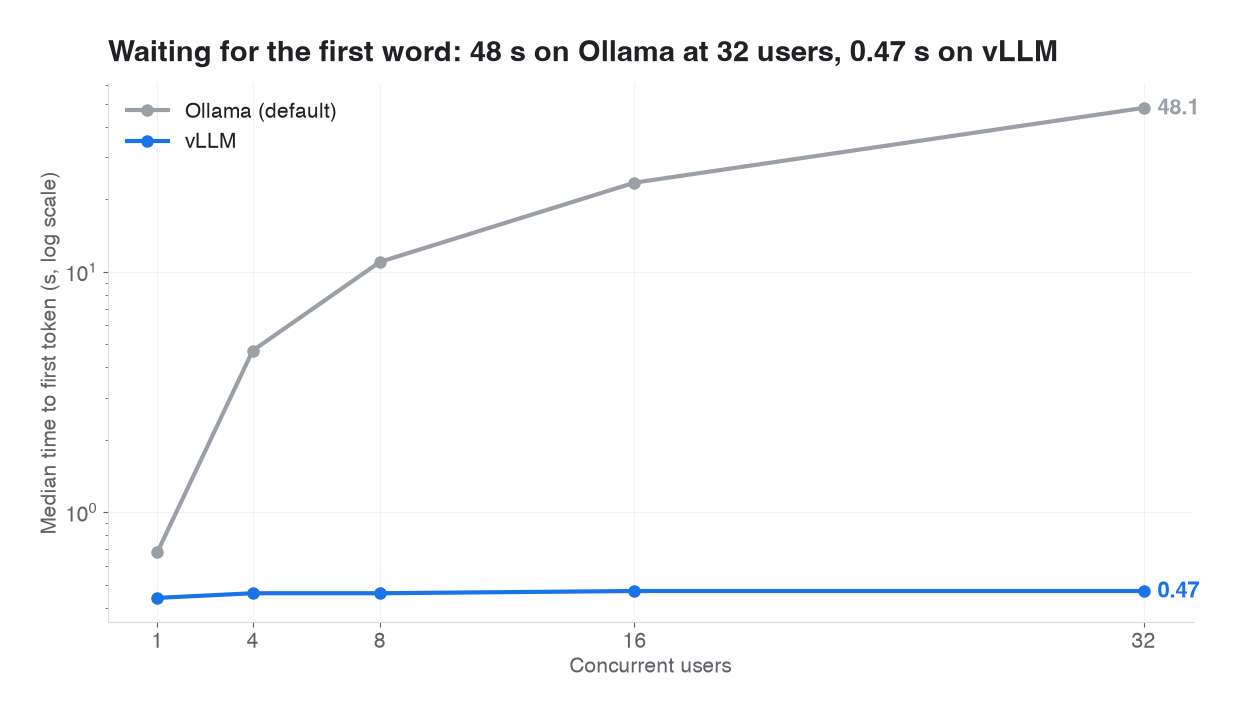
Median time to first token, log scale. Ollama's requests queue; vLLM's batch.
Observations:
- Single user: Ollama wins by 2.4×. With one request in flight, the GPU's work is dominated by reading weights. Ollama's 4-bit model is roughly a quarter the size of vLLM's BF16 model, so each token is cheaper to produce.
- Crossover at 4 users. vLLM's continuous batching overtakes Ollama between 1 and 4 users.
- Ollama saturates immediately. Throughput stays at about 160 tok/s from 4 to 32 users because requests are served one at a time. Added users queue: median TTFT grows linearly with load, reaching 48 seconds at 32 users.
- vLLM scales almost linearly to 1,235 tok/s, a 7.7× advantage, while TTFT stays under 0.5 s at the median. Per-user speed falls only from 52 to 43 tok/s.
- Headroom remains. vLLM reported room for about 90 concurrent 4,096-token conversations in its KV cache. At 32 users, compute rather than memory was the limit, and per-user speed was still high. The 32-request cap was a configuration choice, not the hardware ceiling.
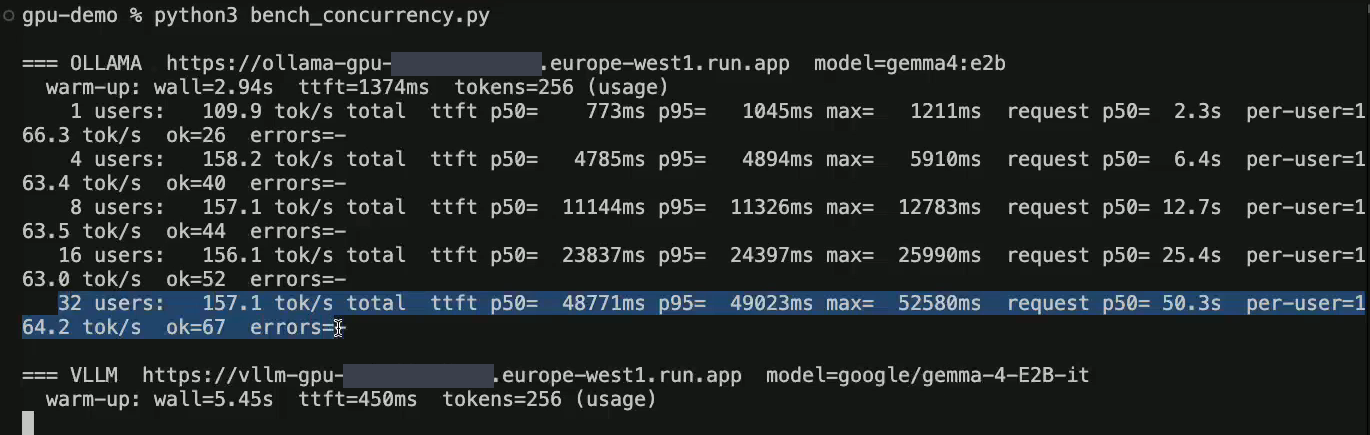
The benchmark running live: Ollama finished, with its 32-user line highlighted (157.1 tok/s, 48.8 s median wait), and vLLM warming up. The tables use our dry run from the same day, so their values differ slightly.
4.2 Cost per million output tokens (RQ2)
| Users | Ollama $/1M tokens | vLLM $/1M tokens |
|---|---|---|
| 1 | $3.48 | $8.35 |
| 4 | $2.45 | $2.28 |
| 8 | $2.46 | $1.12 |
| 16 | $2.47 | $0.58 |
| 32 | $2.47 | $0.32 |
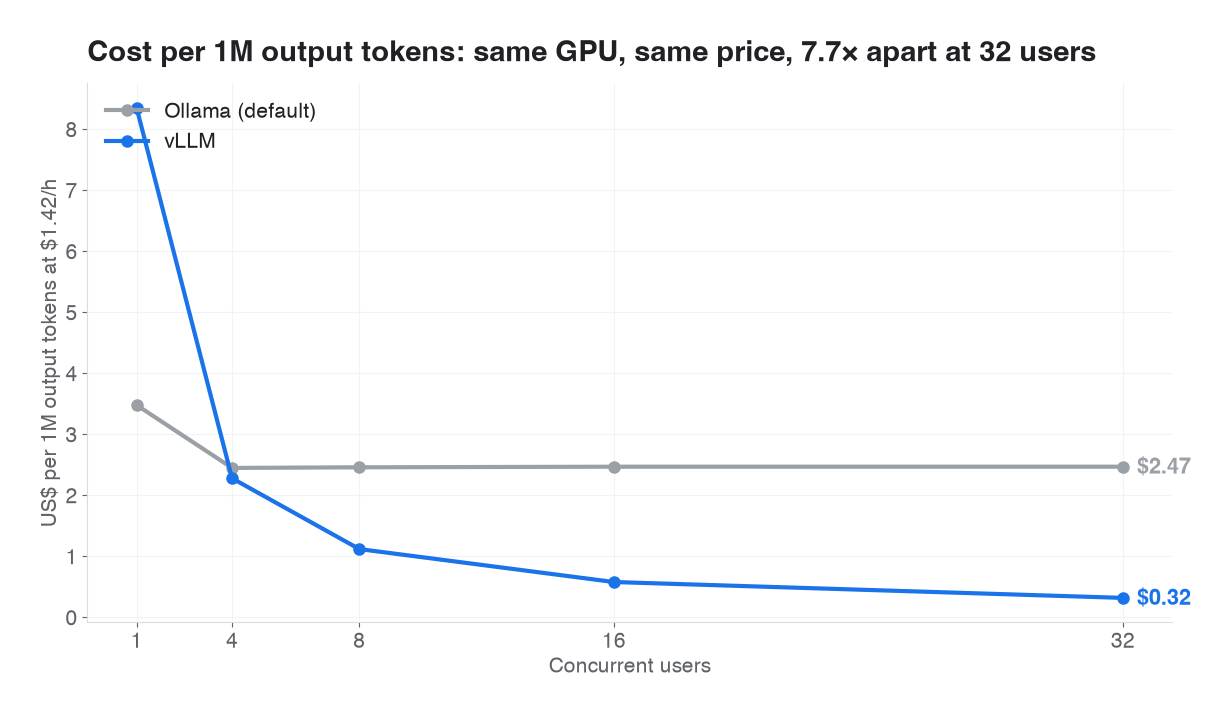
Cost per 1M output tokens at $1.42/h with the GPU kept busy.
At one user, Ollama is cheaper per token. From four users, vLLM is cheaper, and at 32 users it is 7.7× cheaper on identical hardware at an identical hourly price. The choice of inference engine is a cost decision as much as a technical one.
4.3 GPU utilization is not GPU efficiency (RQ3)
We pulled Cloud Run's GPU metrics (container/gpu/utilizations, container/gpu/memory_usages) for the benchmark windows.
| GPU utilization (during the race) | GPU memory used | Delivered throughput | |
|---|---|---|---|
| Ollama | 79–83% | 3.5 GB (14%) | ~160 tok/s |
| vLLM | 100% | 17–21 GB (70–90%) | up to 1,235 tok/s |
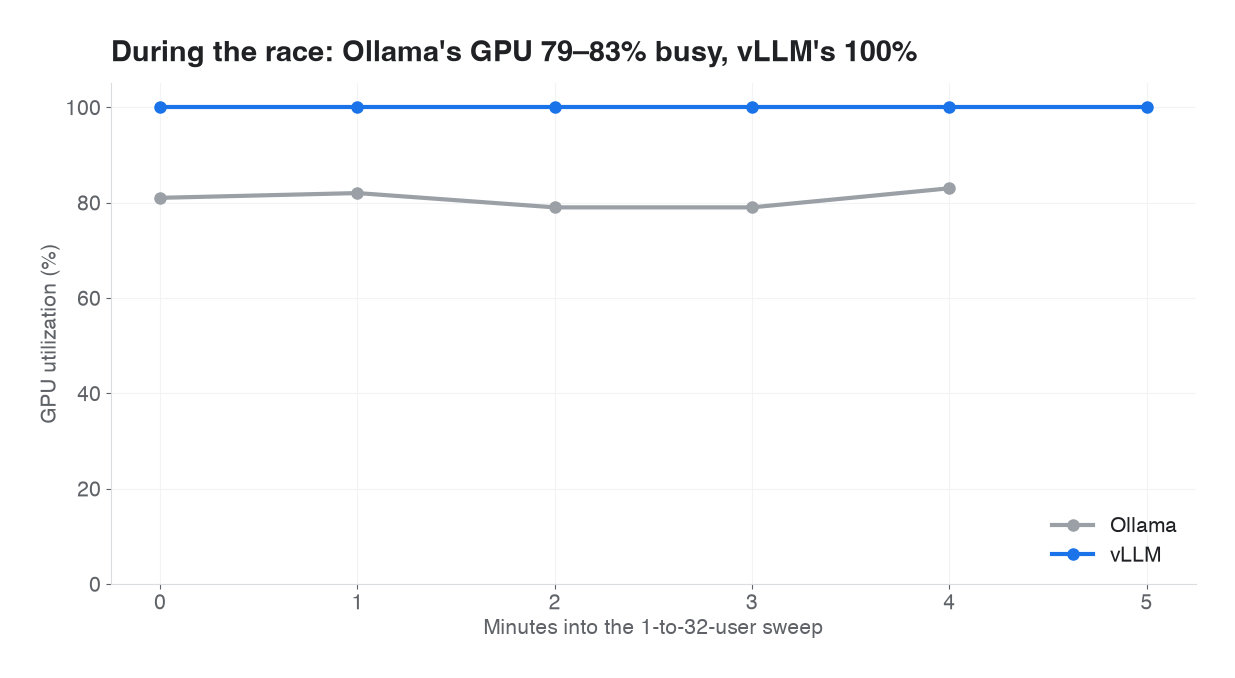
Cloud Monitoring, container/gpu/utilizations, during the race. A GPU can look 81% busy while delivering 7.7× fewer tokens.
Ollama's GPU looked 82% busy while producing 7.7× fewer tokens than vLLM. GPU utilization measures the fraction of time the GPU is running anything, not how much of its capacity is used. A GPU serving one request at a time can look nearly full.
Memory tells a similar story in reverse. vLLM reserves 70–90% of GPU memory at startup, even with zero users, because of --gpu-memory-utilization=0.90 and its KV-cache pool. Ollama used 3.5 GB, leaving about 20 GB idle.
Implication: neither GPU utilization nor GPU memory percentage is a reliable signal of efficiency or load for LLM serving. Measure tokens per second per dollar. This also explains Google's documented design choice: "Cloud Run does not automatically scale the number of instances based on GPU utilization". It scales on request concurrency instead. In our data, GPU utilization would have been a misleading scaling signal.
4.4 Cold start
| Phase (vLLM, weights from Hugging Face) | Time |
|---|---|
| Container boot → vLLM starts | ~45 s |
| Download weights (anonymous, Hugging Face) | 185–217 s |
| Load weights into GPU | ~3 s |
| torch.compile | ~48–50 s |
| CUDA graphs, KV cache, warm-up | ~35 s |
| Instance start → ready (measured twice) | ~7 min |
Ollama's cold start, with its 4-bit model read from a mounted Cloud Storage bucket, was about 4.5 minutes to the first answer, followed by a one-off stall of about 25 s on the next request. Both services scaled to zero about 10 minutes after their last request. Hugging Face once answered HTTP 429 to the anonymous download; vLLM retried successfully.
4.5 Beyond one instance: the scale-out gap (RQ4)
We raised vLLM's --max-instances to 2 and ran 32 users, then 48 users, for 5 minutes each.
| Time | Event |
|---|---|
| 0:00 | 32 users on one instance |
| 1:19 | Cloud Run starts a second instance (log: "Starting new instance. Reason: AUTOSCALING") — before the first instance was full and before any request queued |
| 5:05 | 48 users. Instance 1 runs at its cap (vLLM log: "Running: 32 reqs"); extra requests wait in Cloud Run's queue |
| 7:40 | Second instance ready: 6 min 21 s after it started |
| 7:45+ | Traffic splits across both instances |
| Users | Total tok/s | TTFT median | TTFT p95 | TTFT max | Errors |
|---|---|---|---|---|---|
| 32 (one instance) | 1,234 | 0.47 s | 0.83 s | 2.5 s | 0 |
| 48 (one instance, then two) | 1,619 | 0.48 s | 5.8 s | 7.3 s | 0 |
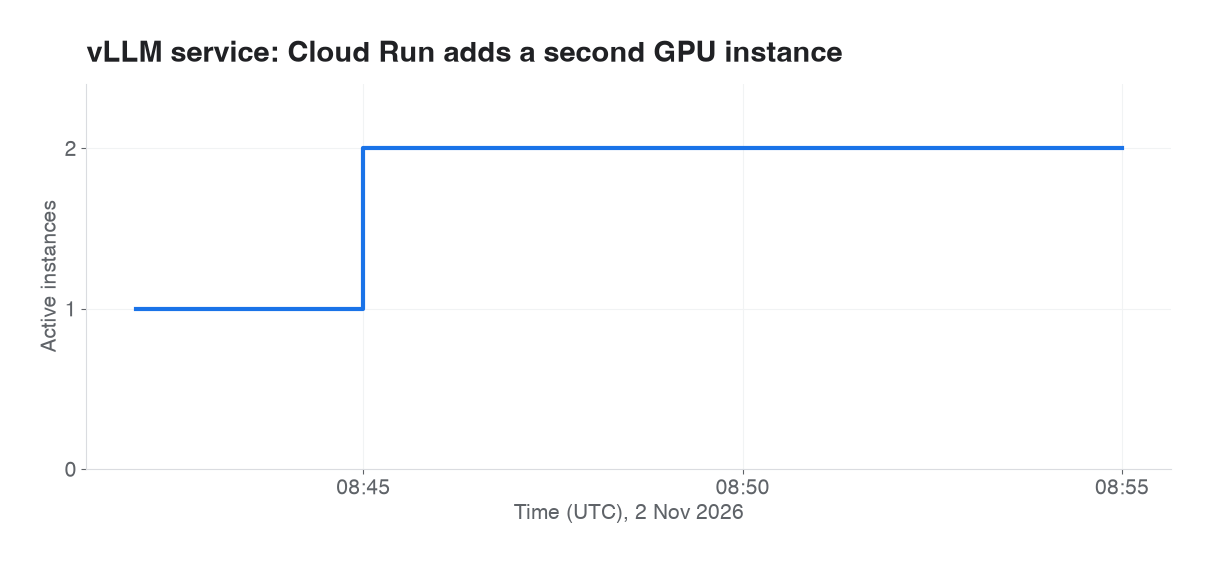
Cloud Monitoring, container/instance_count (active), vLLM with --max-instances 2.

Cloud Monitoring, GPU utilization per instance: the second instance sits near 0% for minutes while billed.
GPU metrics confirm the gap. While the second instance booted, the 99th-percentile GPU utilization across instances was 100% (the busy instance) and the median was about 1% (the booting one). For 6 minutes, one GPU was saturated while a second, billed GPU produced nothing. Instance-based billing charges from instance start. Users on the saturated instance saw p95 TTFT rise from 0.8 s to 5.8 s. No requests were rejected.
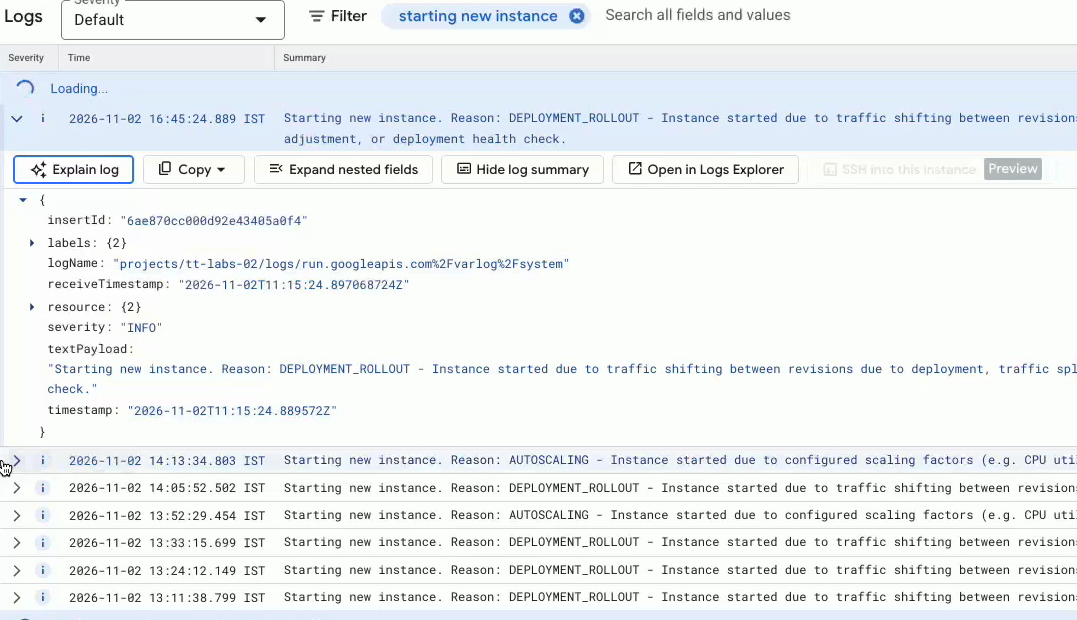
Cloud Run logs filtered on "starting new instance": each entry gives the reason, so you can separate instances started by autoscaling from those started by a deployment.
4.6 Phase 2: Ollama with 32 parallel slots
Readers pointed out that Ollama's TTFT in Section 4.1 looked like queueing, not generation. That was correct: with one slot, Cloud Run let 32 requests into the instance and 31 of them waited inside Ollama. We redeployed Ollama with OLLAMA_NUM_PARALLEL=32. Everything else was unchanged: image, model, bucket, instance shape, concurrency, context and prompts. The startup log confirmed the setup: offloaded 36/36 layers to GPU, n_seq_max = 32, n_ctx_seq = 4096, KV cache 1.7 GiB.
We ran the sweep three times: twice with 60-second windows and once with 120-second windows at 4, 8 and 16 users. The table shows medians.
| Users | Ollama phase 1 tok/s | Ollama phase 1 TTFT p50 | Ollama phase 2 tok/s | Ollama phase 2 TTFT p50 | vLLM tok/s | vLLM TTFT | vLLM vs Ollama phase 2 |
|---|---|---|---|---|---|---|---|
| 1 | 113 | 0.68 s | 111 | 0.71 s | 47 | 0.44 s | Ollama 2.4× |
| 4 | 161 | 4.7 s | 148 | 0.82 s | 173 | 0.46 s | 1.2× |
| 8 | 160 | 11.0 s | 159 | 0.94 s | 352 | 0.46 s | 2.2× |
| 16 | 160 | 23.5 s | 241 | 1.08 s | 686 | 0.47 s | 2.8× |
| 32 | 160 | 48.1 s | 359 | 1.48 s | 1,235 | 0.47 s | 3.4× |
Cost per 1M output tokens at 32 users: phase 1 $2.47 · phase 2 $1.10 · vLLM $0.32
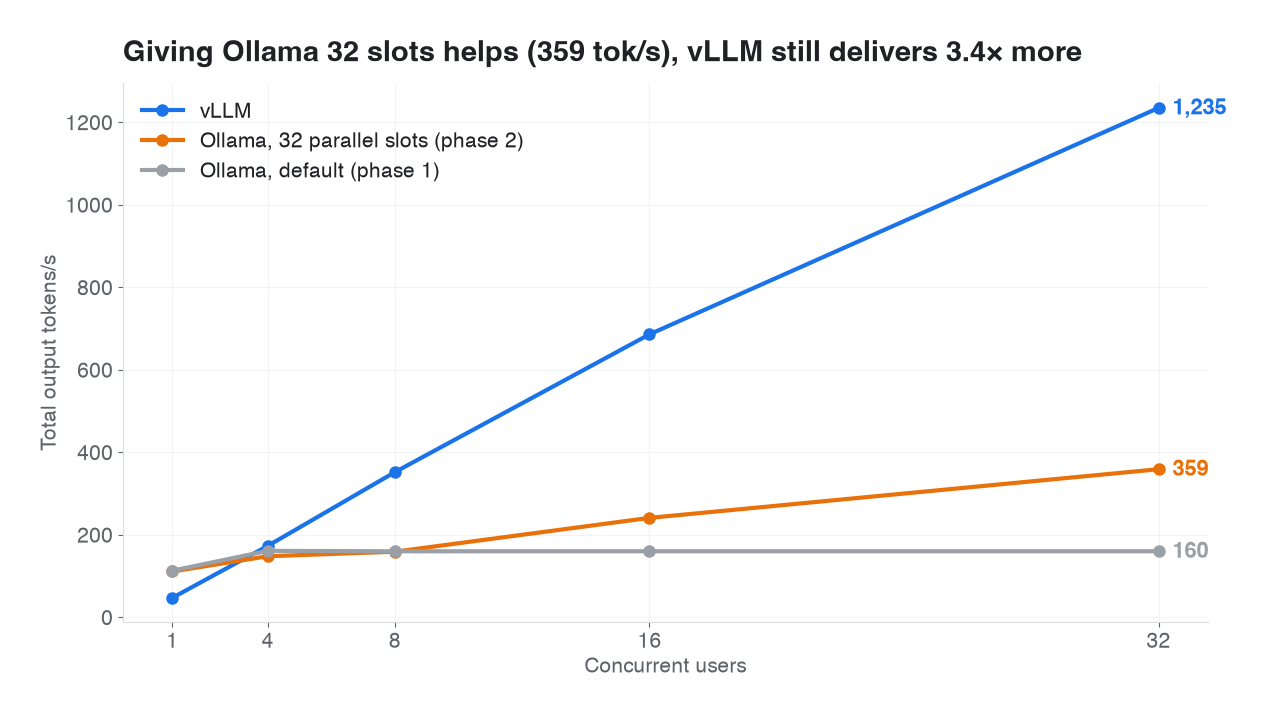
Phase 2: Ollama with OLLAMA_NUM_PARALLEL=32 (median of three runs) against phase 1 and vLLM.
Observations:
- The queueing disappears. Median TTFT at 32 users fell from 48 s to 1.5 s.
- Throughput improves but flattens. Ollama reached 359 tok/s at 32 users, 2.3× its default, but per-user speed fell from 164 tok/s (1 user) to 42 (4 users) and 14 (32 users). vLLM still delivered 43 tok/s per user at 32. Batching in vLLM shares each weight read across users far more effectively.
- Run-to-run variance is real at mid-load. At 8 users the three runs gave 269, 155 and 159 tok/s. At 32 users the runs agreed (356, 361).
- Memory is not the limit. Ollama used 5.5 GB of 22 GB under full load, and GPU utilization read 66–81%.
We do not know how much speculative decoding contributes under load. Drafting helps a single stream, but at large batch sizes the extra verification work can cost more than it saves. A run with drafting disabled would settle this.
Scale-out with Ollama: routed before ready. We repeated the Section 4.5 test on the phase 2 service with --max-instances 2:
| Time (UTC) | Event |
|---|---|
| 15:25:59 | Cloud Run starts a second instance (AUTOSCALING), at 32 users |
| 15:26:05 | Ollama opens its port → default TCP startup probe passes → instance receives traffic |
| 15:28:05 | Model weights offloaded to GPU |
| 15:29:58 | Model loaded, first answers from instance 2 |
| Users | Total tok/s | TTFT median | TTFT p95 | TTFT max | Errors |
|---|---|---|---|---|---|
| 32 | 83 | 5.4 s | 274 s | 278 s | 0 |
| 48 | 551 (2 GPUs) | 1.1 s | 6.8 s | 9.2 s | 0 |

Cloud Logging, the second Ollama instance: the port opens 6 s after start, so the default TCP probe passes, but the model is on the GPU 2 minutes later and answering only at 15:29:58.
Users routed to the new instance waited up to 4.6 minutes for their first token. Cloud Run did nothing wrong: by the default TCP probe, the container was ready. vLLM avoided this because its /health probe only passes once the engine can serve. With Ollama on Cloud Run, define an HTTP startup probe that only passes once the model is loaded, for example a small wrapper that preloads the model before opening the port. Otherwise every scale-out sends users to a GPU that can't answer yet.
5. Discussion
5.1 Choosing an engine
| Choose Ollama when | Choose vLLM when |
|---|---|
| One user or a small team (2.4× faster for a single user here) | Real concurrent traffic (3.4× throughput at 32 users vs tuned Ollama, 7.7× vs Ollama's defaults) |
| Laptop, edge, quick prototypes | GPU servers: Cloud Run, GKE, VMs, Model Garden |
| 4-bit GGUF models, easy model switching | OpenAI-compatible serving at max tokens per GPU |
| Fast start-up matters most | Cost per token matters most |
vLLM buys its throughput with complexity: more flags, a 10.9 GB image, BF16 weights, and about 7-minute cold starts. That cost is not worth paying for a single user.
5.2 Paying for the scale-out gap
Because Cloud Run scales on request concurrency and a new GPU instance needs a full cold start, every scale-out event has a cost. There is no free option:
| Strategy | What you pay with |
|---|---|
| Keep one GPU warm (--min-instances 1) | ≈ $1.42 × 730 h ≈ $1,040/month per L4 |
| Scale to zero, accept the gap | Some users wait during every scale-out |
| Cap --max-instances, return 429s | Clients must retry with backoff |
The fourth lever is to shorten the cold start. In a side experiment, storing the weights in a Cloud Storage bucket and reading them over Direct VPC with Private Google Access cut weight loading from 176 s to 79 s, and instance start to ready from ~7 min to under 5 min. Loading strategies deserve a study of their own.
5.3 Operational lessons
- Pin the image version. Google publishes its own vLLM build for Model Garden, but its friendly tags (
gemma4,latest) move, and its newest version tag lagged upstream (v0.20 vs v0.33). Pinning upstream gives an exact, portable version. Cloud Run pulls Docker Hub images through Google's mirror; on v0.33.0's release day the mirror did not yet have the tag (Image ... not found). It resolved within hours. - Size the startup probe from a measured cold start, not from an example value.
- Disable every unused modality on multimodal models.
- Turn off thinking explicitly when benchmarking reasoning-capable models, and verify it per engine and per endpoint.
- Do not use GPU utilization as an efficiency KPI for LLM serving.
6. Limitations
- Unequal precision. Ollama ran 4-bit and vLLM BF16, each engine's typical default. This favours Ollama at one user. A 4-bit vLLM run (e.g.
gemma-4-E2B-it-qat-w4a16-ct) would likely narrow the single-user gap. - Ollama untuned in phase 1. Phase 1 used Ollama's default of one parallel request. Phase 2 (Section 4.6) corrects this. Other Ollama settings (flash attention, KV cache type, speculative decoding off) were not explored.
- Unequal speculative decoding. Ollama decoded speculatively in both phases, and vLLM did not. vLLM supports speculative decoding, which we did not enable.
- vLLM capped at 32 sequences. vLLM had headroom for about 90; higher settings were not tested.
- Few runs, short windows. Phase 1 had two runs per level (the tables use the dry run; the recorded run's throughput was within 3%) and phase 2 had two to three, with 60–120 s windows and 5 minutes for scale-out tests. At 8 users, phase 2 runs varied by up to 1.7×. Headline ratios at 32 users were stable; we did not compute confidence intervals.
- Synthetic workload. Fixed 256-token outputs, eight prompts, closed-loop users with no think time. Real traffic has variable lengths and arrivals.
- Client-side TTFT includes the India-to-Belgium network round trip for both engines.
- One model, one GPU type, one region, list prices on one day.
- Scale-out timing comes from a single run. Cloud Run's exact scale-out trigger is not documented beyond request concurrency; the early start we observed may vary.
7. Conclusion
On the same NVIDIA L4 and the same Gemma 4 E2B model on Cloud Run, Ollama is the better single-user engine and vLLM is the better serving engine. vLLM overtook Ollama at four users. At 32 users it delivered 7.7× the throughput of Ollama's defaults, where users waited up to 48 seconds. Against Ollama with 32 parallel slots it still delivered 3.4× the throughput at 3.4× lower cost per token. Tuning Ollama removed the queue but not the gap. Cloud Run's GPU utilization metric did not reflect this difference. Its autoscaling, which works on concurrency, started a second GPU early and billed it for more than six minutes before it served anyone. For production LLM serving on Cloud Run, choose the engine by concurrency, judge efficiency by tokens per dollar, and decide explicitly how you will pay for the scale-out gap.
Appendix: reproduce it
Quick single-request comparison:
# Ollama
curl -s $OLLAMA_URL/v1/chat/completions -H "Content-Type: application/json" -d '{
  "model": "gemma4:e2b",
  "messages": [{"role": "user", "content": "Explain how a load balancer works in 5 sentences."}],
  "max_tokens": 256, "reasoning_effort": "none"}'

# vLLM
curl -s $VLLM_URL/v1/chat/completions -H "Content-Type: application/json" -d '{
  "model": "google/gemma-4-E2B-it",
  "messages": [{"role": "user", "content": "Explain how a load balancer works in 5 sentences."}],
  "max_tokens": 256, "chat_template_kwargs": {"enable_thinking": false}}'
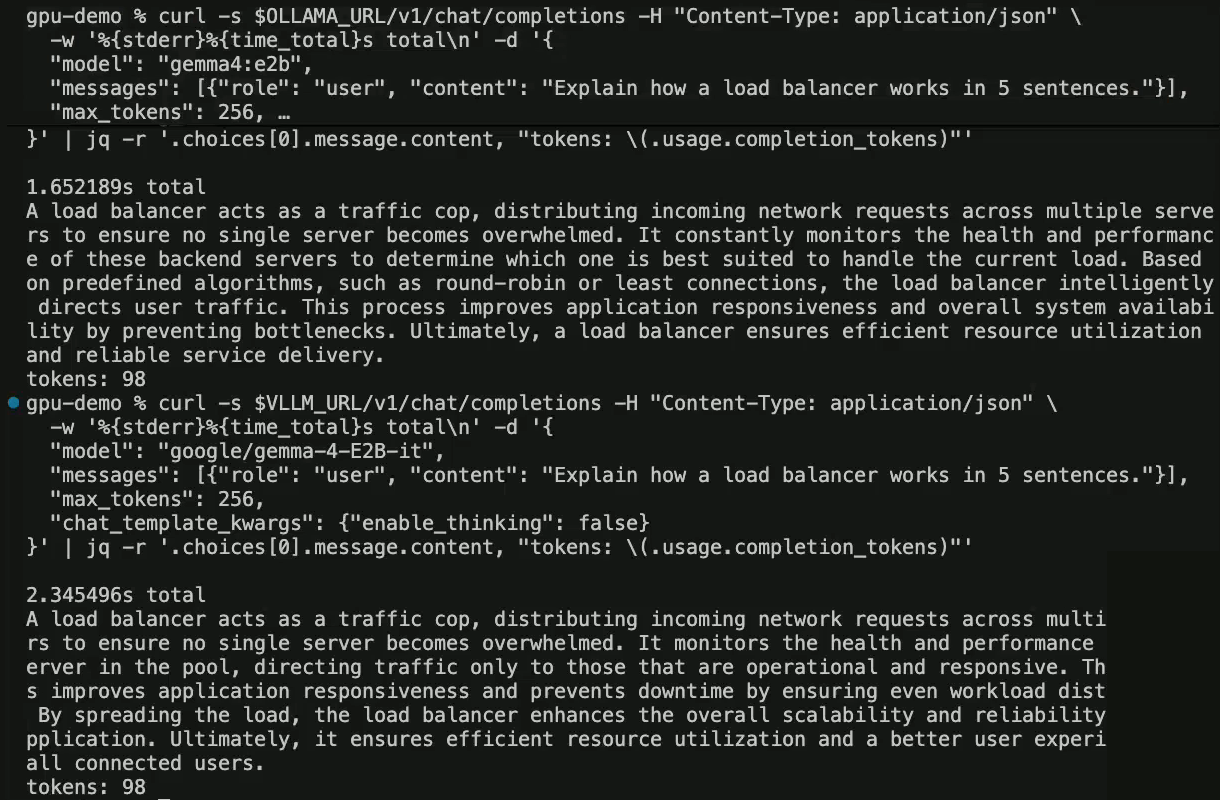
One question, one request each: "Explain how a load balancer works in 5 sentences." Ollama took 1.65 s and vLLM 2.35 s, for 98 tokens each. The right edge is cut off where the webcam covered it.
References
- Kwon et al., Efficient Memory Management for Large Language Model Serving with PagedAttention, SOSP 2023: https://arxiv.org/abs/2309.06180
- vLLM documentation, installation and hardware support: https://docs.vllm.ai/en/latest/getting_started/installation/
- vLLM Gemma 4 recipe: https://docs.vllm.ai/projects/recipes/en/latest/Google/Gemma4.html
- Google Cloud — Run Gemma 4 on Cloud Run with vLLM: https://docs.cloud.google.com/run/docs/run-gemma-on-cloud-run
- Google Cloud — Best practices for AI inference on Cloud Run with GPUs: https://docs.cloud.google.com/run/docs/configuring/services/gpu-best-practices
- Google Cloud — Configure GPUs for Cloud Run services: https://docs.cloud.google.com/run/docs/configuring/services/gpu
- Gemma 4 E2B model card: https://huggingface.co/google/gemma-4-E2B-it
- Ollama — gemma4 model: https://ollama.com/library/gemma4 · FAQ: https://docs.ollama.com/faq
- vLLM container images: https://hub.docker.com/r/vllm/vllm-openai/tags
Companion study: CPU vs GPU for LLM inference on Cloud Run