Self-Hosting Open LLMs on Google Cloud: When It Pays Off, and Which of the Four Options to Choose
By Vishal Bulbule · November 6, 2026 · 14 min read · Cloud
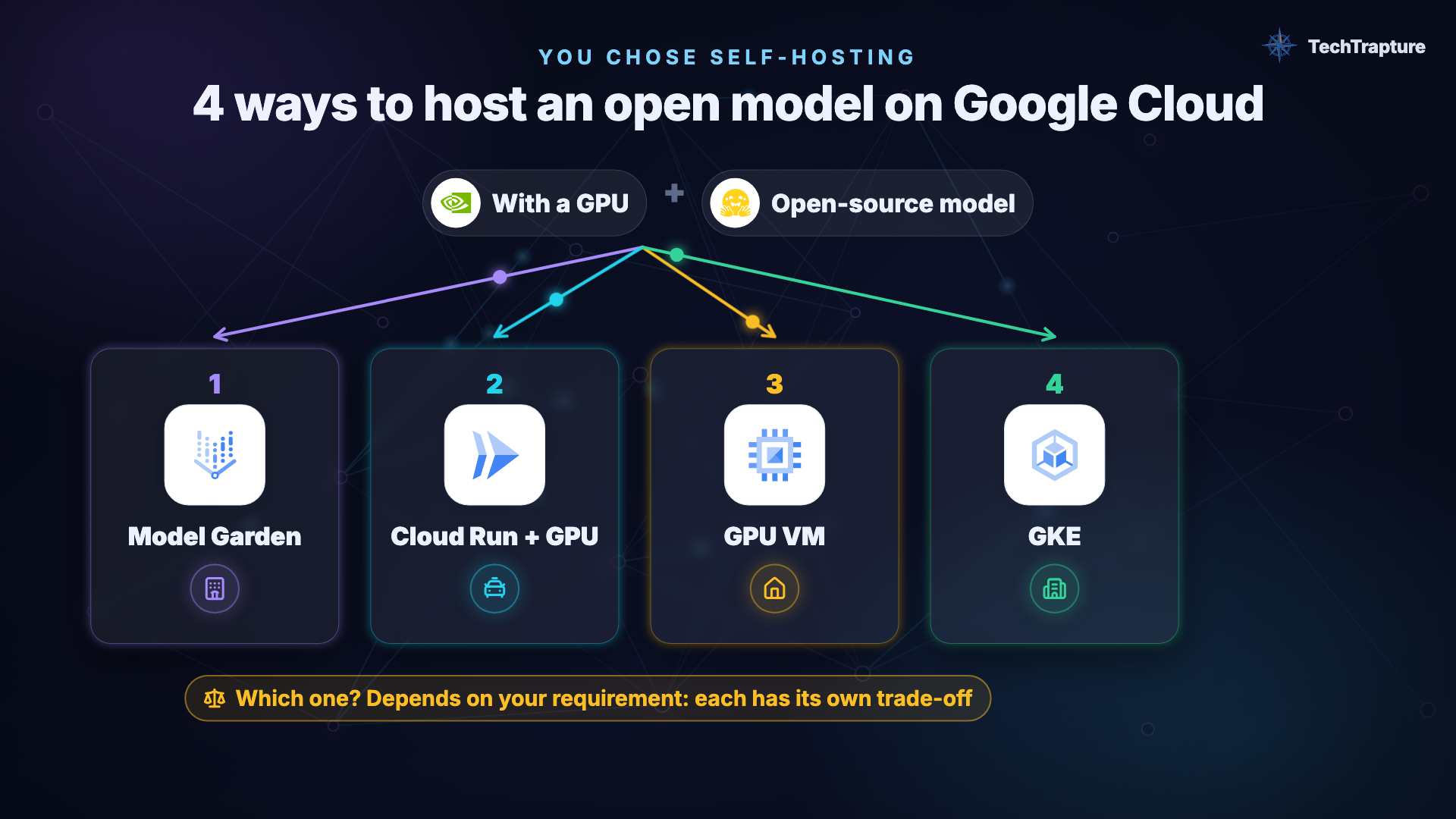
A decision framework built on list prices and our own benchmarks: API vs self-hosting, Model Garden vs Cloud Run vs GPU VM vs GKE, and the quota wall you will hit first
Vishal Bulbule · Google Developer Expert (Google Cloud) · TechTrapture
Cover: The four ways to self-host an open model on Google Cloud: Model Garden, Cloud Run + GPU, a GPU VM, and GKE.
Abstract
Open-weight models such as Gemma, Qwen, Llama and DeepSeek can be downloaded and run anywhere. That raises two questions for every team building on them: should we self-host at all, or call a managed API? And if we self-host on Google Cloud, which of the four main options should we use? The options are Vertex AI / Agent Platform Model Garden, Cloud Run with GPUs, Compute Engine GPU VMs, and GKE.
We compare the options on management effort, available hardware, billing model, and cost, using Google Cloud list prices (Billing Catalog, 2 Nov 2026) and our own measurements on an NVIDIA L4. The deciding factor is utilization. A busy self-hosted GPU served Gemma 4 E2B at $0.32 per million output tokens (vLLM, 32 concurrent users), but a single request to an otherwise idle Cloud Run GPU cost about $0.24, because the instance is billed until it scales to zero. Per hour, Cloud Run is the most expensive option ($1.42/h vs $0.71/h for a GPU VM); it wins only because it can scale to zero. Above roughly 12 hours of use per day, a GPU VM is cheaper. We also document the first operational barrier, GPU quota, including the free-trial restriction that blocks GPUs on VMs entirely. We close with a decision framework.
1. Introduction
Running an open model on a laptop is easy. Tools like Ollama make it a one-line command. Serving the same model to an application or a team is a different problem. A laptop is not always on, has no HTTPS endpoint or authentication, and answers one request at a time.
Teams moving from laptop to production face a sequence of decisions:
- Whether to self-host, or call a managed API (Gemini, or an open model offered as a service).
- Where to self-host: on Google Cloud, four main options with very different billing models.
- Which inference engine runs inside: Ollama or vLLM.
- How to get GPUs: quota, which is the first error most teams see.
This post works through them in order, with prices and measurements rather than opinions.
Research questions
- RQ1: Under what conditions is self-hosting preferable to a managed API?
- RQ2: How do the four Google Cloud hosting options differ in effort, hardware and billing?
- RQ3: How do costs compare, and where are the break-even points?
- RQ4: What blocks teams on day one?
2. Method
- Sources: Google Cloud documentation for each service (references at the end), current as of 2 Nov 2026.
- Prices: list prices from the Google Cloud Billing Catalog API, read 2 Nov 2026, before discounts (no Spot, no committed-use discounts), for one NVIDIA L4 GPU.
- Measurements: our own benchmarks on Cloud Run with an NVIDIA L4 (europe-west1), published as companion studies:
- CPU vs GPU for LLM inference on Cloud Run (Gemma 2 2B, Ollama)
- Ollama vs vLLM on Cloud Run with an NVIDIA L4 (Gemma 4 E2B, 1–48 concurrent users)
- Cost formula for a busy instance:
cost per 1M output tokens = price per hour ÷ (tokens/s × 3600) × 1,000,000
3. Should you self-host at all? (RQ1)
An analogy that holds up: a managed API is a taxi; self-hosting is owning a car. With the taxi you pay per ride and someone else does the maintenance, but you go where taxis go. With your own car you pay every month even while it is parked, and you fix it yourself, but you go anywhere, any time.
3.1 When a managed API is the better choice
- Low or spiky traffic. You pay per token, so zero requests means zero bill.
- No operations. No GPUs, drivers, scaling, patching or 2 a.m. pages.
- Highest quality. Frontier models are far larger than anything that fits on one GPU.
- Instant scale. Ten users or ten thousand is the provider's problem.
3.2 When self-hosting is the better choice
| Reason | What it means | Example |
|---|---|---|
| Data privacy / residency | Prompts and outputs stay in your project/VPC; no third-party model provider in the path | Regulated data (healthcare, EU personal data), source code |
| Security & network control | Private endpoint, your IAM and firewall; can run fully offline | Banking, government, air-gapped environments |
| Model lifecycle control | Your weights are never retired by someone else's deprecation schedule | See 3.3 |
| Custom / fine-tuned weights | Your fine-tune or LoRA isn't on any API | A model tuned on your tickets |
| Cost at steady high volume | A busy GPU makes each token cheap | 24×7 internal assistant |
| Hardware, region, no limits | Only limit is your GPU, not a provider quota | Batch over millions of documents |
3.3 Lifecycle risk is real
On 21 October 2026, Google retired a batch of open-model APIs on its platform, including Qwen, older DeepSeek versions, Llama 3.3 70B, GLM and Kimi K2. Applications built on those endpoints had to migrate. A self-hosted copy of the weights would have kept running.
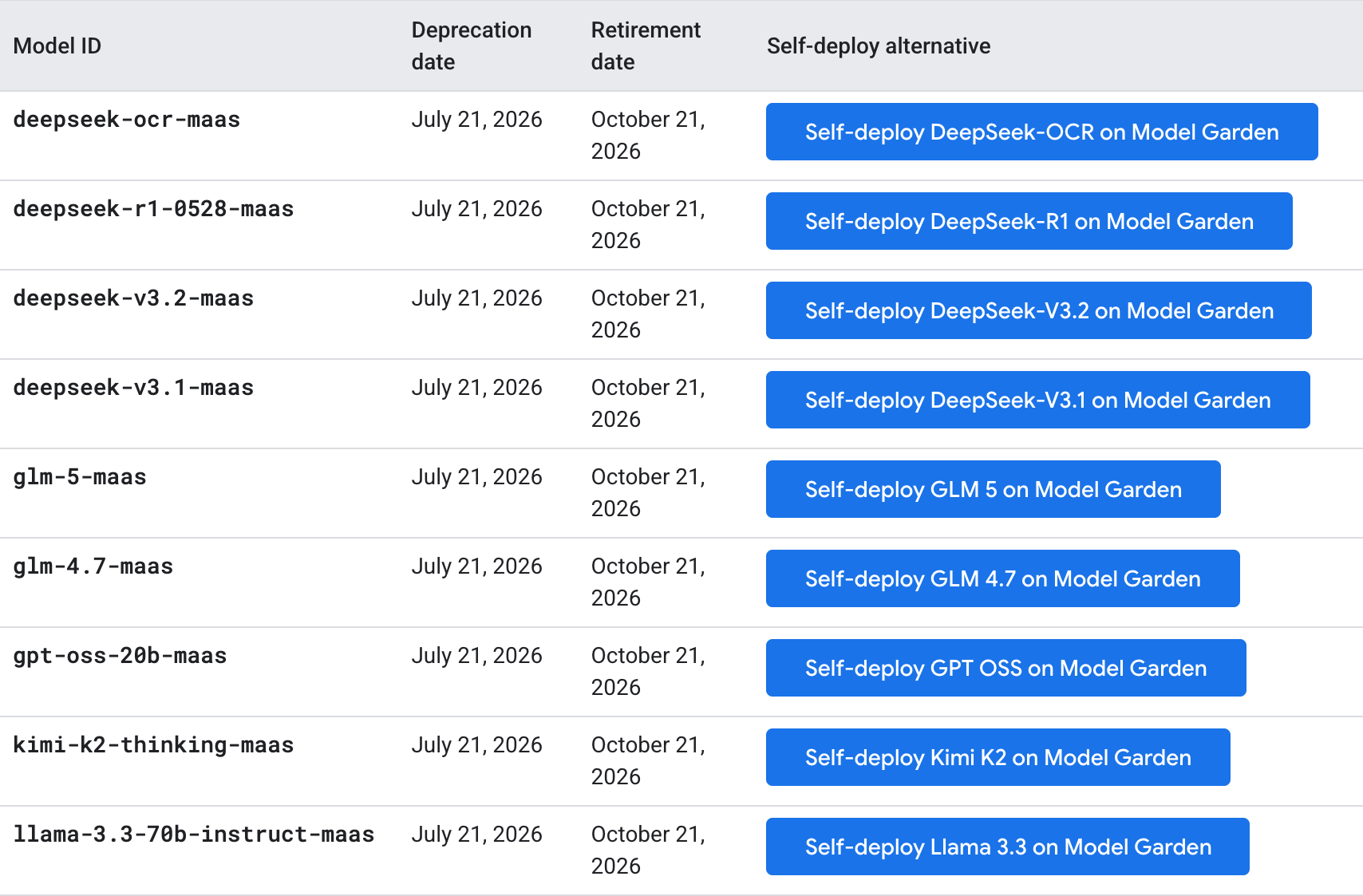
Google's open-model deprecations page: a batch of open-model APIs retired on 21 October 2026.
3.4 What self-hosting costs you
- You pay for idle. The GPU is billed while it exists, answering or not.
- You operate it. Scaling, patching, monitoring and security become your job. Some engines ship with no authentication at all; Ollama is one, so never expose it without an auth layer in front.
- Smaller models. One 24 GB L4 comfortably serves models in the ~2–9B range, not frontier-scale models.
- GPU scarcity. You may not get the GPU you want in the region you want (Section 6).
Finding (RQ1): start with an API. Self-host when privacy, network control, lifecycle control or custom weights require it, or when traffic is steady enough to keep a GPU busy.
4. The four options on Google Cloud (RQ2)
Every option has the same three layers, client → inference engine (Ollama / vLLM) → model weights, on a GPU. What differs is who runs which layer, and how you are billed.
| Model Garden (Agent Platform) | Cloud Run + GPU | GPU VM (Compute Engine) | GKE | |
|---|---|---|---|---|
| Analogy | Hotel room: ready when you arrive | Taxi you can call your own way | Renting a flat | Running the hotel |
| You manage | Almost nothing: pick a model, Deploy | The container | OS, drivers, engine, security | Cluster, manifests (nodes on Standard) |
| GPUs | All, plus TPU | L4, RTX PRO 6000 (1 per instance) | All | All, plus TPU |
| Billing | Per machine-hour from deploy to undeploy; min 1 replica (scale to zero: Preview) | Per second while an instance lives; $0 when scaled to zero | Per second while the VM runs; stopped = disk only | Cluster fee + nodes (GPU nodes can scale to zero, slowly) |
| Best for | Steady traffic, least effort, enterprise controls | Spiky/low traffic, internal tools, demos | Learning, one steady box, full control | Many models/teams, high scale |
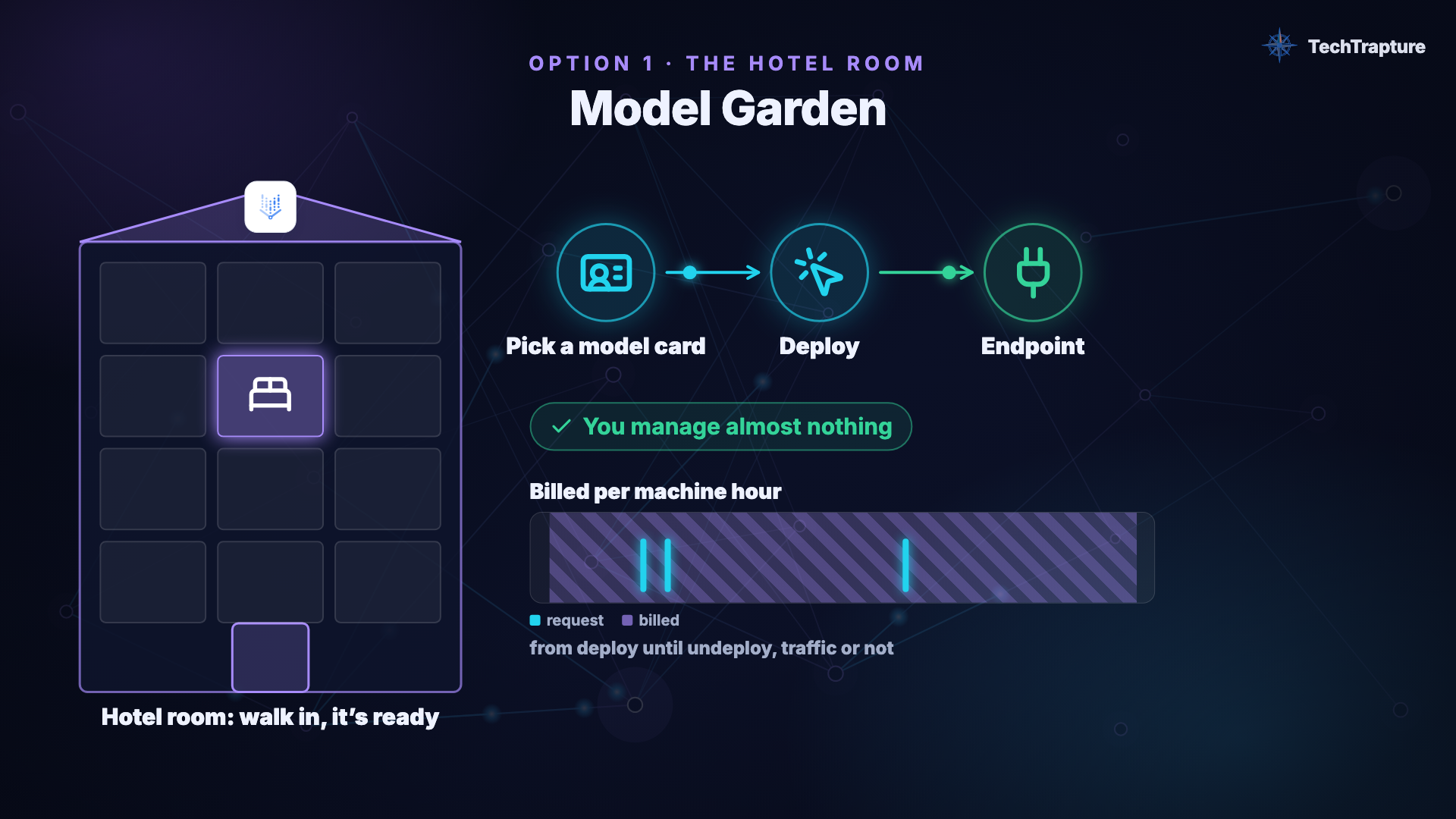
Model Garden, the hotel room: pick a model card, deploy, get an endpoint. Billed per machine-hour from deploy until undeploy.
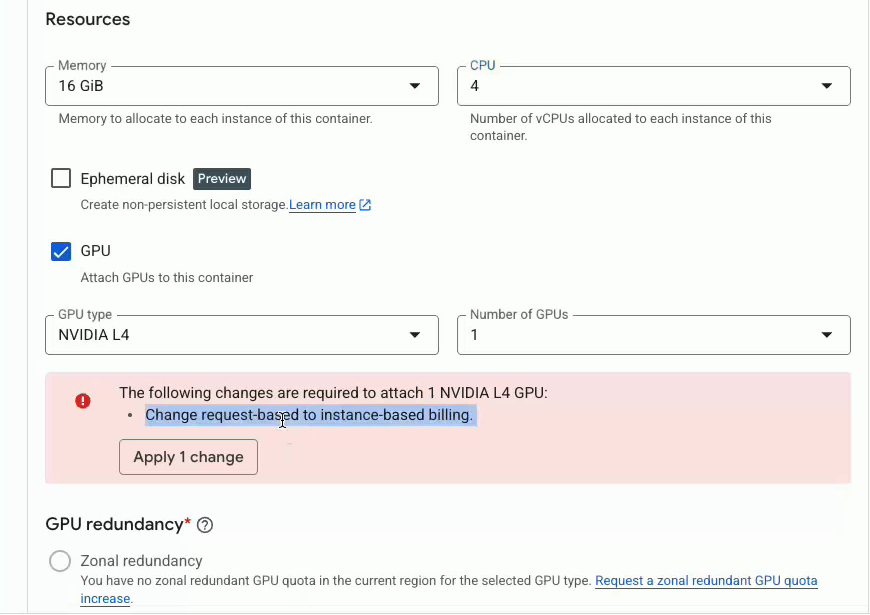
Cloud Run with one NVIDIA L4 attached (from the CPU vs GPU recording). Attaching a GPU switches the service to instance-based billing.
Naming note: Model Garden lives in what was called Vertex AI; Google's documentation now places it under Gemini Enterprise Agent Platform.
Video walkthrough
5. Cost analysis (RQ3)
5.1 Price per hour, one NVIDIA L4 (list prices, 2 Nov 2026)
| Option | $/hour while it exists | Left on all month |
|---|---|---|
| GPU VM, g2-standard-4 (us-central1) | ~$0.71 | ~$515 |
| Cloud Run, L4 + 8 vCPU / 32 GiB (no zonal redundancy, europe-west1) | ~$1.42 | ~$1,040 |
| Model Garden endpoint, g2-standard-12 + L4 | ~$1.30 | ~$950 (cannot stop: min 1 replica) |
| GKE | node price (≈ VM) + cluster fee ($0.10/h; free tier covers one cluster) | — |
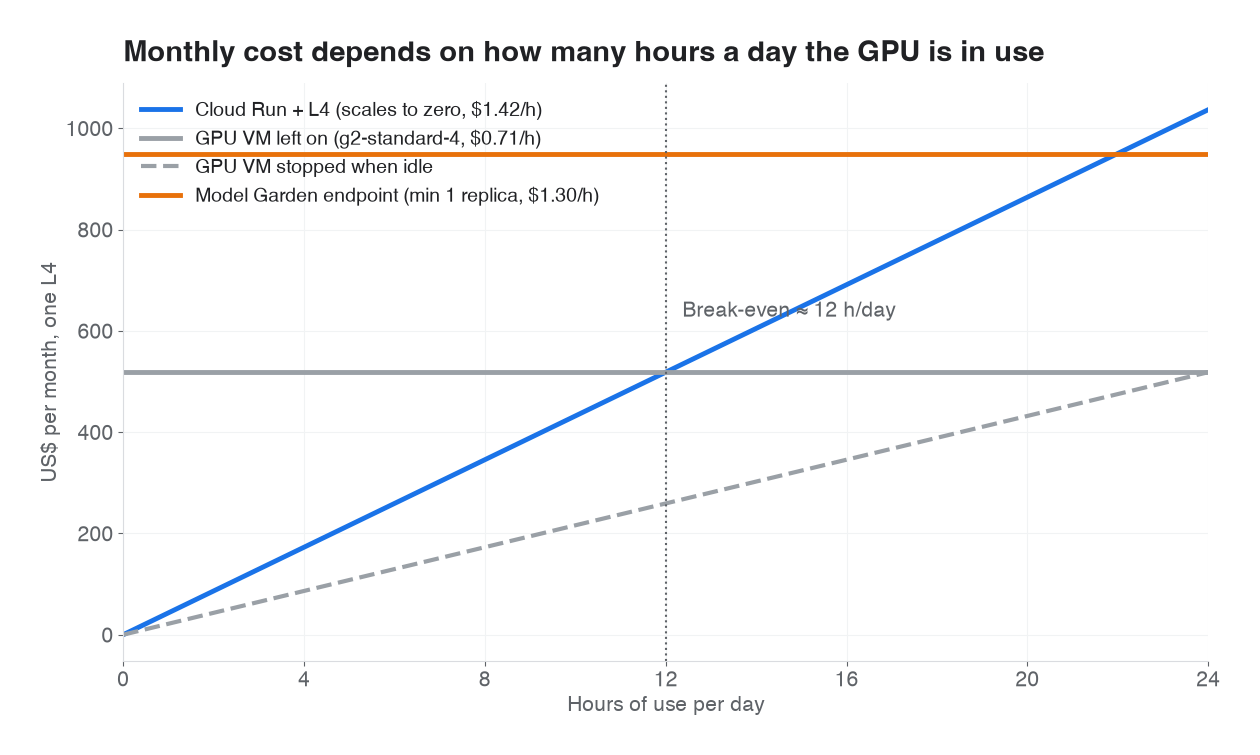
One L4, list prices 2 Nov 2026. Cloud Run wins below ~12 hours of use a day; a VM left on wins above it.
Per hour, Cloud Run is the most expensive option. It wins only because it scales to zero.
- Break-even, Cloud Run vs an always-on VM: $1.42 × h × 30 = $515 → h ≈ 12 hours/day. Above about 12 hours of use per day, a VM left running is cheaper. Below it, Cloud Run is. Cloud Run's idle tail per scale-out (Section 5.3) moves the break-even lower in practice.
- Model Garden costs roughly 30% more than an equivalent VM. That is the price of Google running the serving stack for you.
5.2 Busy GPU: cost per token depends on the engine
Measured on Cloud Run, one L4 at $1.42/h, Gemma 4 E2B:
| Engine and load | Throughput | Cost per 1M output tokens |
|---|---|---|
| Ollama, 1 user | 113 tok/s | $3.48 |
| Ollama, 32 users (queued) | 160 tok/s | $2.47 |
| vLLM, 1 user | 47 tok/s | $8.35 |
| vLLM, 32 users | 1,235 tok/s | $0.32 |
Same GPU, same price per hour: a 7.7× difference in cost per token, decided by the inference engine and how busy it is.
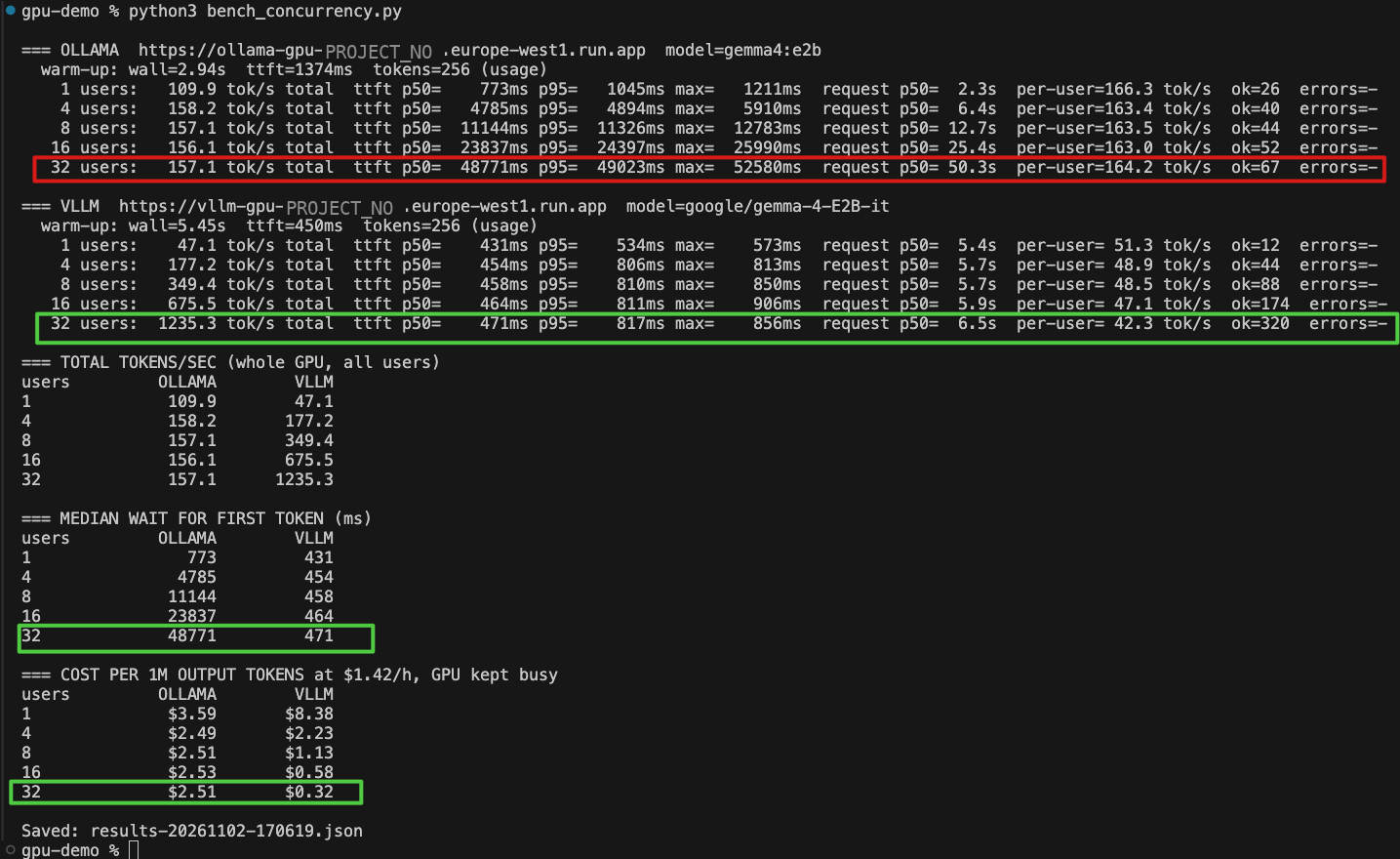
The raw benchmark output behind these costs, from the recorded run. The table above uses our dry run from the same day, so its values differ slightly.
5.3 Idle GPU: the cost of one lonely request
Instance-based billing charges for the whole instance lifetime. In our runs a Cloud Run GPU instance scaled to zero about 10 minutes after its last request. One isolated request therefore costs roughly:
~10 minutes × $1.42/hour ≈ $0.24 per answer
The same 256-token answer on a busy vLLM instance costs 256 × $0.32 / 10⁶ ≈ $0.00008. That is a gap of about 3,000× for the same model on the same GPU. Utilization, not the platform, dominates the cost of self-hosting.
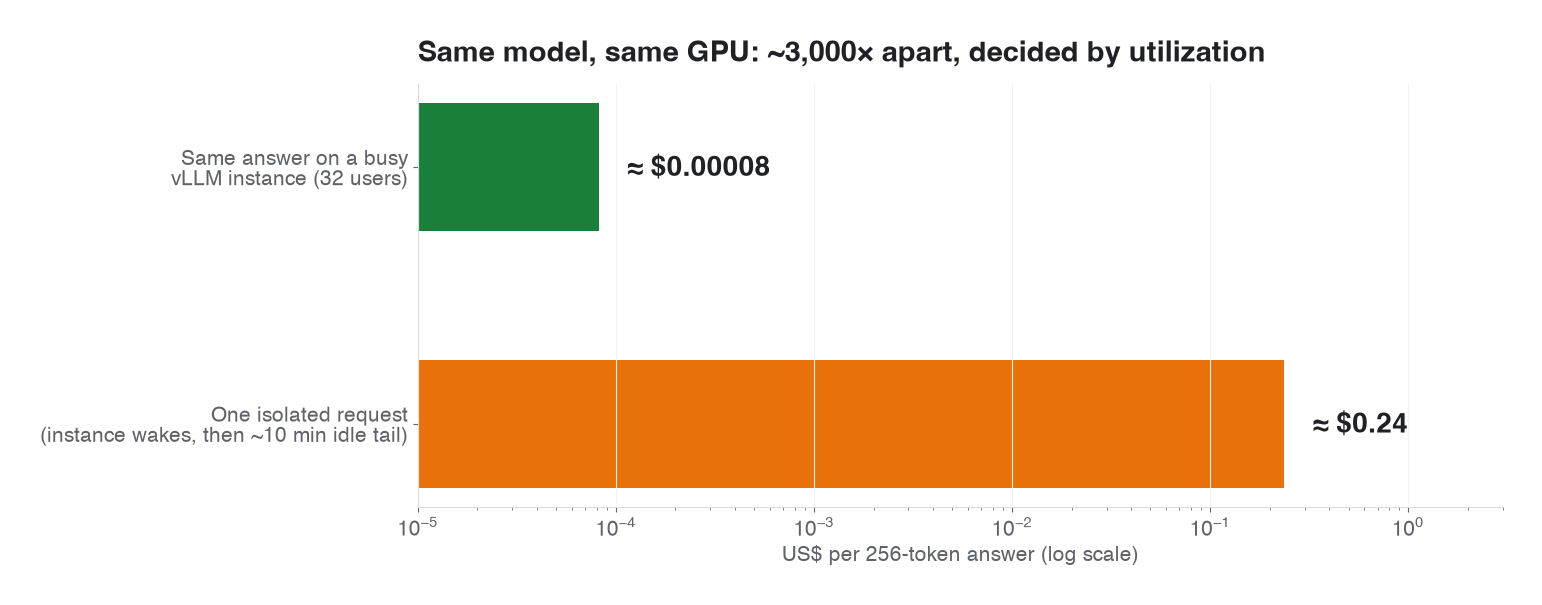
One isolated request pays for the idle tail; a busy vLLM instance spreads the GPU across many users.
Finding (RQ3): self-hosting is cheap when the GPU is busy and expensive when it is idle. Pick the option whose billing matches your traffic: scale-to-zero (Cloud Run) for low or spiky traffic, always-on (VM, Model Garden, GKE) for steady traffic, with the engine (vLLM) doing the batching.
6. The first barrier: GPU quota (RQ4)
GPUs are rationed per project, per region, per GPU type, and per product. A team's first error is usually a quota error, and that is normal.
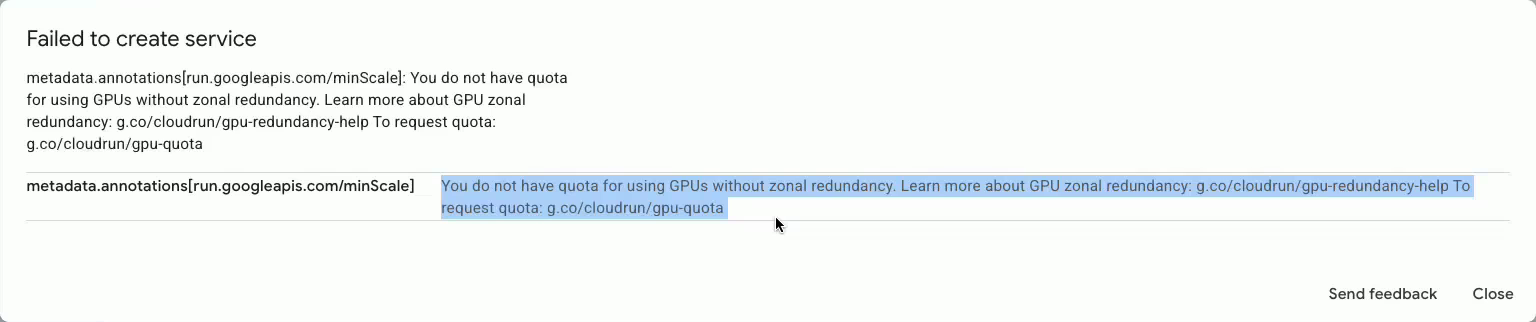
The error from our own recording: Cloud Run refused the GPU service because the project had no quota for L4s without zonal redundancy in that region.
Free-trial restriction. New accounts get $300 credit for 90 days. While on the free trial (not upgraded to a paid billing account), you cannot add GPUs to VM instances and cannot request quota increases. Upgrading keeps the remaining credit within the original 90 days, and existing resources keep running.
Cloud Run. Projects receive 3 × L4 (without zonal redundancy) in a region automatically on their first GPU deployment there. Google notes that requests for zonal-redundancy-off quota are more likely to be granted.
Quota is per product. L4 quota for Cloud Run does not give you L4s for Compute Engine or for Model Garden endpoints. Each has its own quota.
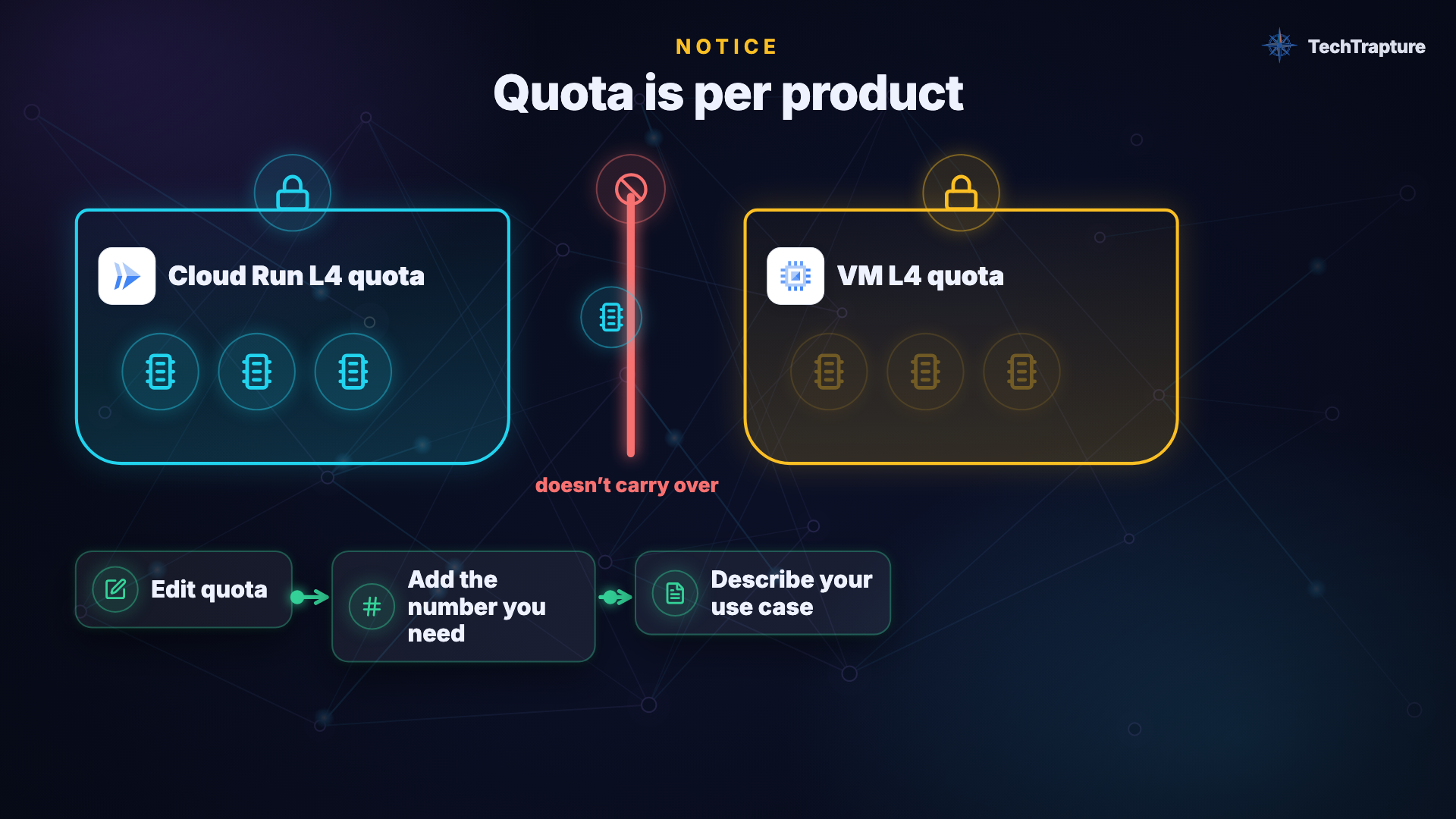
GPU quota is per product: Cloud Run's L4 quota does not give you L4s for Compute Engine or Model Garden.
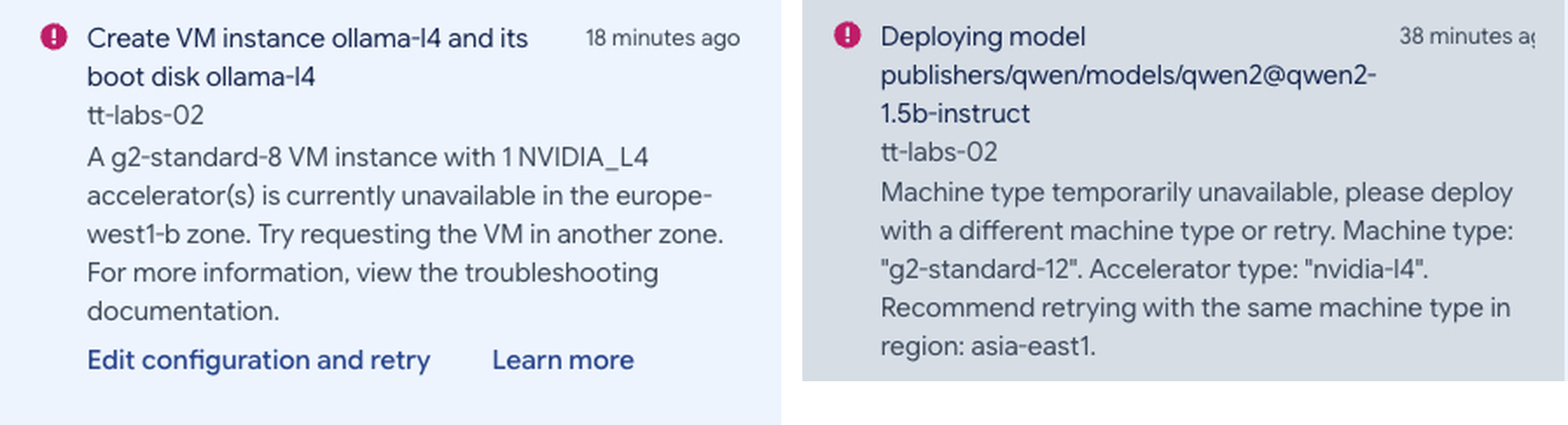
Quota is not the only wall. Two real failures from our 3 Nov runs: a g2-standard-8 VM with an L4 unavailable in europe-west1-b, and a Model Garden deployment that could not get a g2-standard-12 with an L4.
Finding (RQ4): check quota for the exact product, region and GPU before designing around it, and move off the free trial before planning any GPU VM.
7. The engine inside the box
Whichever option you pick, an inference engine loads the model and answers requests.
| Ollama | vLLM | |
|---|---|---|
| Analogy | Home kitchen: easy, one family | Restaurant kitchen: many tables at once |
| Model format | 4-bit GGUF: small, fits easily | Hugging Face weights, usually BF16 |
| Concurrency | 1 request at a time by default (OLLAMA_NUM_PARALLEL=1) | Continuous batching + PagedAttention: many users share one GPU |
| Runs on | CPU or GPU, laptop to cloud | GPU first (Linux); CPU for testing |
| Measured, 1 user | 113 tok/s | 47 tok/s |
| Measured, 32 users | 160 tok/s (users wait up to 48 s) | 1,235 tok/s (median wait 0.47 s) |
| Pick it for | Development, single user, small team | Production traffic |
On Cloud Run, a VM or GKE you choose the engine. Model Garden deploys vLLM-family serving containers for you.
8. Decision framework
1. Do privacy, network control, lifecycle control or custom weights require self-hosting?
      No  → Is traffic steady enough to keep a GPU busy?
              No  → Use a managed API.
              Yes → Self-host (continue).
      Yes → Self-host (continue).

2. How steady is the traffic?
      Low or spiky, OK with cold starts     → Cloud Run + GPU (scales to zero)
      Steady, want least effort             → Model Garden endpoint
      Steady, want control / lowest $/hour  → GPU VM (stop it when idle)
      Many models, teams, high scale        → GKE

3. How many concurrent users?
      One or a few                          → Ollama
      Many                                  → vLLM

4. Before you build: confirm GPU quota for that product, region and GPU type.
9. Limitations
- List prices only, for one GPU type (L4) and specific regions, on one date. Spot VMs, committed-use discounts and negotiated pricing change the break-even points, usually in favour of always-on options.
- Measurements cover one model family (Gemma) on one GPU type. Larger models change the hardware options and the economics.
- Idle-tail duration (about 10 minutes) is what we observed, not a documented guarantee.
- Feature status changes. Model Garden scale-to-zero was in Preview at the time of writing, and GPU availability per product and region changes frequently.
- Managed-API pricing was not benchmarked here. Compare your expected tokens per month against the current price of the model you would otherwise call.
10. Conclusion
Self-hosting an open model on Google Cloud is neither inherently cheaper nor more expensive than calling an API. It is cheaper when you keep the GPU busy. A busy L4 running vLLM served tokens at $0.32 per million; the same GPU answering one isolated request cost about $0.24 for that single answer.
Choose a managed API by default. Self-host when privacy, control, lifecycle or custom weights demand it, or when traffic is steady. Then match the hosting option's billing to your traffic pattern: Cloud Run for spiky, VM or Model Garden for steady, GKE for scale. Pick the engine by concurrency. And check your GPU quota before you design anything.
References
- Google Cloud — Choose an open model serving option: https://docs.cloud.google.com/gemini-enterprise-agent-platform/models/open-models/choose-serving-option
- Google Cloud — Open model deprecations: https://docs.cloud.google.com/gemini-enterprise-agent-platform/models/deprecations/open-models
- Google Cloud — Configure GPUs for Cloud Run services: https://docs.cloud.google.com/run/docs/configuring/services/gpu
- Google Cloud — Compare compute options: https://docs.cloud.google.com/docs/compute-area/choose-compute-options
- Google Cloud — GKE pricing: https://cloud.google.com/kubernetes-engine/pricing
- Google Cloud — Free Trial and Free Tier features and limits: https://docs.cloud.google.com/free/docs/free-cloud-features
- Google Cloud — Cloud Run pricing: https://cloud.google.com/run/pricing
- Ollama — FAQ (parallel requests): https://docs.ollama.com/faq
- Kwon et al., Efficient Memory Management for Large Language Model Serving with PagedAttention, SOSP 2023: https://arxiv.org/abs/2309.06180
Companion studies: CPU vs GPU for LLM inference on Cloud Run · Ollama vs vLLM on Cloud Run with an NVIDIA L4